

FluentCart Review: The Lightweight WordPress eCommerce Plugin for Digital Creators

Tired of clunky eCommerce tools? FluentCart is the simple, powerful WordPress plugin built to sell without the bloat. Create and customize checkout pages in minutes, manage products with ease, and boost conversions with built-in order bumps and upsells. Lightweight, fast, and made for WordPress — FluentCart turns your site into a sales machine. And because it’s fully self-hosted, you own your data and never get trapped in pricey SaaS platforms.
- Easy setup and customization directly inside WordPress
- Lightweight and fast compared to bloated ecommerce plugins
- Built-in features like order bumps and upsells to increase sales
- Fully self-hosted so you own your data and control your store
- No ongoing SaaS subscription fees or platform lock-in
- Seamless integration with the Fluent suite of plugins (FluentCRM, FluentCommunity, etc.)
- No custom product abilities
- Shipping integration due Q4
- Not quite ready for physical product shipping & inventory

FluentCart Review Introduction
FluentCart Review: Why You Need to Read This Before Choosing Your eCommerce Platform. Are you tired of wrestling with bloated WordPress eCommerce plugins that slow your site to a crawl? Frustrated with software-as-a-service platforms that trap your data behind monthly fees and lock you into their ecosystem? You’re not alone.
For years, WordPress site owners have faced an impossible choice: use WooCommerce and deal with countless extensions, database bloat, and performance issues—or surrender control to SaaS platforms like Shopify that hold your customer data hostage and charge you every single month.
Enter FluentCart
Built from the ground up by WP Manage Ninja, the team behind Fluent CRM, Fluent Forms, and Fluent Community, FluentCart is a modern, lightweight eCommerce solution designed specifically for digital creators, course sellers, membership site owners, and software vendors who want to sell smarter without sacrificing speed or control.
WP Manage Ninja calls FluentCart its most ambitious project yet. In fact, they have so many plans for it that they created a new company called FluentCart. They expect to release new updates and features on a weekly basis.
With that level of commitment behind it, I was eager to get my hands on FluentCart and see if it lives up to the hype.
I’ve spent weeks testing FluentCart in multiple environments, from early pre-release versions to the official launch. I’ve built test stores, processed orders, explored every feature, and compared it head-to-head with the competition. In this comprehensive review, I’ll show you precisely what FluentCart can do today, what’s coming soon, and whether it’s the right eCommerce solution for your WordPress site.
What you’ll learn in this FluentCart Review:
If you’re a digital entrepreneur ready to take control of your online sales without the bloat, lock-in, or complexity of traditional solutions, keep reading. FluentCart might be precisely what you’ve been wanting.
What is FluentCart?
FluentCart is a modern WordPress eCommerce plugin that handles both digital and physical products. Although it currently excels at digital sales (such as courses, memberships, licenses, and downloads), advanced physical product features, including integrated shipping and customization, are in active development.
Unlike traditional eCommerce solutions that try to be everything to everyone, FluentCart focuses on what digital entrepreneurs actually need: a fast, lightweight system that handles checkout, subscriptions, and customer management without overwhelming you with unnecessary features.
The Core Philosophy
At its heart, FluentCart was created to solve three major problems plaguing WordPress eCommerce:
Two Versions: Free and Pro
FluentCart comes in two flavors:
FluentCart Core (Free) – Available in the WordPress plugin repository, the core version provides basic eCommerce functionality. It’s open-source, providing a solid foundation for testing the plugin and determining if it meets your needs.
FluentCart Pro – This is where the real power lives. The Pro version includes advanced features like subscriptions, product licensing, order bumps, comprehensive reporting, and premium support. Most serious online sellers will need Pro to unlock FluentCart’s full potential.
Video: FluentCart Review
The video and this article cover different information, so please review both to gain a comprehensive understanding of FluentCart as you make your purchase decision.
What Makes FluentCart Different?
FluentCart sets itself apart from competitors like WooCommerce and Shopify in four significant ways:
1: Built for Digital-First Businesses
While FluentCart supports physical products, its primary focus is digital commerce. This means the interface, features, and workflows are optimized for selling:
2: Native Integration with the Fluent Ecosystem
If you’re already using Fluent CRM, Fluent Community, or other products from the Fluent suite, FluentCart integrates seamlessly. Purchase triggers can automatically:
This tight integration eliminates the need for complex Zapier workflows or third-party connectors.
3: Modern, Developer-Friendly Architecture
FluentCart is built with modern PHP standards and includes:
4: Page Builder Flexibility
FluentCart works with your preferred WordPress page builder:
You can design your shop, product pages, and checkout exactly how you want them to look, using shortcodes and builder elements.
What FluentCart Is NOT
To set proper expectations, let’s be clear about what FluentCart isn’t trying to be:
Not a WooCommerce replacement for physical stores – If you run a complex inventory operation with advanced shipping calculations, dropshipping integrations, and warehouse management, WooCommerce remains the better choice. FluentCart offers basic physical product support, but its strength lies in digital commerce. This is likely to change in the future, but the initial release doesn’t offer as much support for physical product shipping or customization.
Not a marketplace solution – FluentCart doesn’t currently support multi-vendor marketplaces or complex vendor commission structures (although these may be added later).
Not a mature ecosystem (yet) – Unlike WooCommerce, with its thousands of extensions, FluentCart is new. The third-party plugin ecosystem is still developing. However, this also means you won’t need as many extensions since core features are built in.
FluentCart Review: The Bottom Line
FluentCart is a purpose-built solution for WordPress users who want to sell digital products, memberships, and licenses without sacrificing site speed or data ownership. It combines the control of self-hosted WordPress with the polish of modern SaaS platforms, minus the monthly fees and lock-in.
If you’re a course creator, membership site owner, software vendor, or digital product seller who values performance and independence, FluentCart deserves serious consideration.
In the sections of this FluentCart Review that follow, I’ll show you exactly how it works, what features you get, and whether it lives up to its promises.
Initial Setup Experience
One of FluentCart’s key strengths is its ability to get you up and running quickly. Unlike WooCommerce, which can take hours to configure properly (especially when adding extensions), FluentCart gets you from installation to your first product in minutes.
Let me walk you through exactly what happens when you install FluentCart for the first time.
Installing the Plugin
After you purchase FluentCart Pro and upload the plugin to your WordPress site, you’ll be greeted with a welcoming dashboard and a brief celebration—complete with digital confetti congratulating you on your installation.
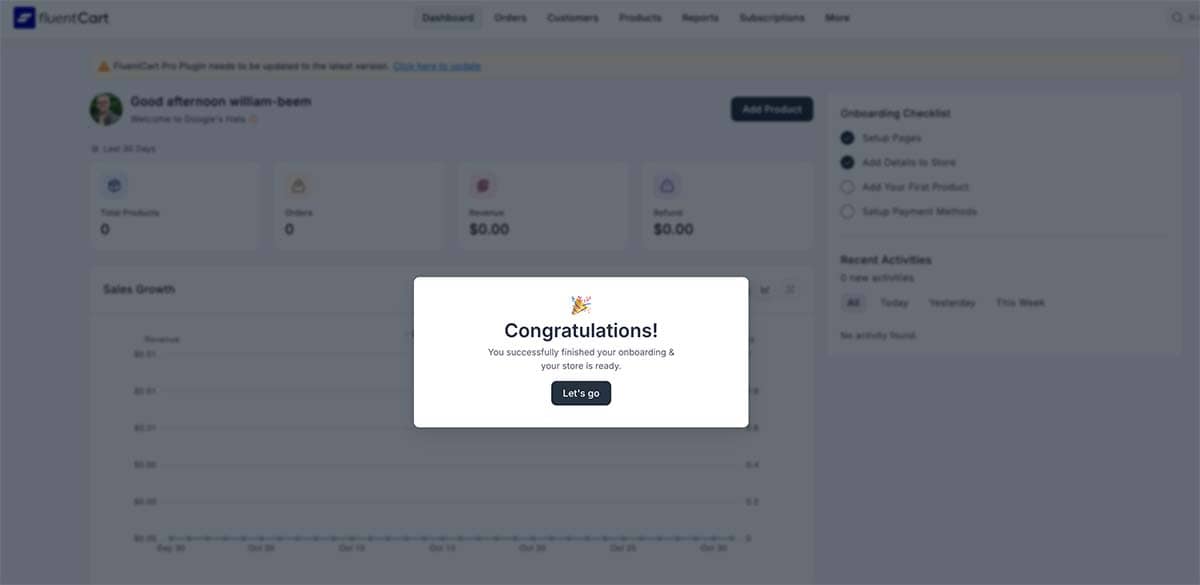
But FluentCart doesn’t just pat you on the back and leave you to figure things out. It immediately presents you with an onboarding checklist that guides you through four essential setup steps:

This simple checklist helps keep you focused and ensures you don’t miss any critical configuration steps. Let’s walk through each one.
Step 1: Setup Pages
Every e-commerce site needs certain pages to function: a shop page, cart, checkout, customer profile, and receipt page. With most platforms, you’d need to create each page in WordPress manually, then search for the correct shortcodes to paste into each one.
FluentCart makes this ridiculously easy.
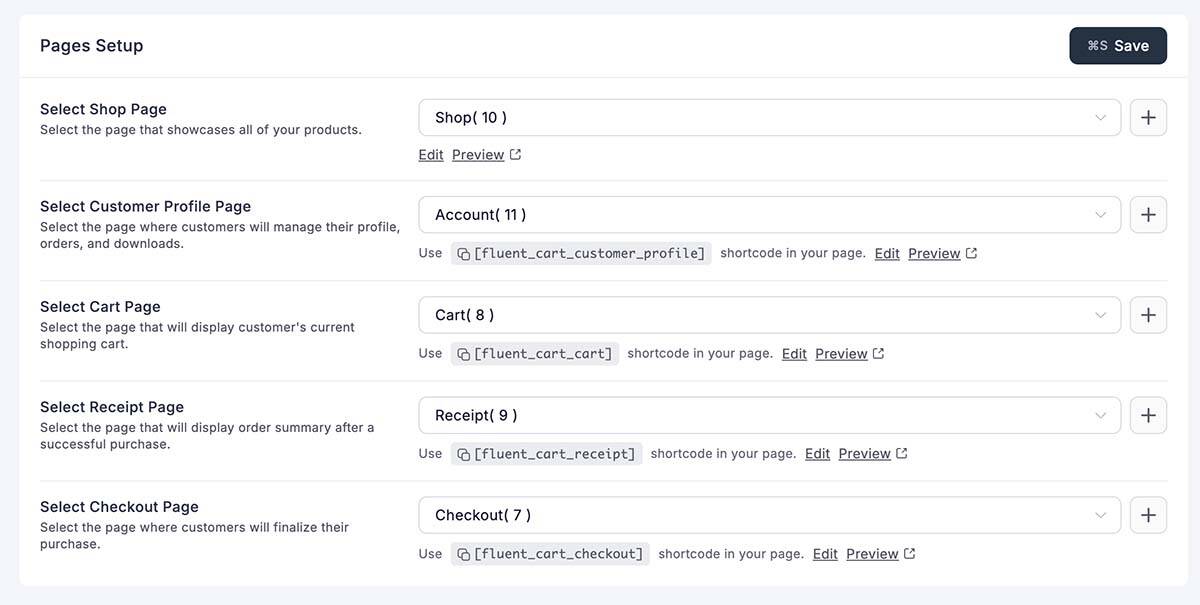
When you click “Setup Pages,” you’ll see a list of all required pages along with their corresponding shortcodes. But here’s the brilliant part: each item has a “+” button on the right side. Click it, and it creates the page for you and embeds the shortcode listed below each field. Click Save, and you’re done.
You don’t have to copy a shortcode here; instead, go to Pages, create a new page, paste the shortcode, publish the page, and then repeat this process for each necessary page. It’s that kind of thoughtful touch that saves you time and shows the care the developers put into crafting this system.
You can also choose to use existing pages if you prefer, or create pages individually. FluentCart gives you flexibility while defaulting to the fastest path.
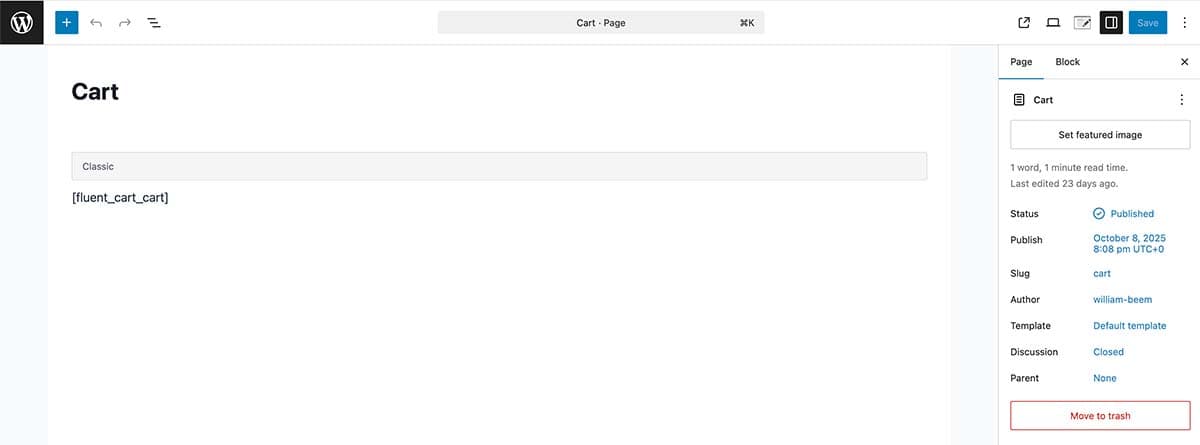
I clicked through to verify, and sure enough, FluentCart created each page with its shortcode already inserted. This is the kind of thoughtful user experience that separates FluentCart from the competition.
Since I’m using WordPress Blocks, I can still style the page anyway I want. I can use other blocks, create headers & footers for the page with my theme. The ability to customize your pages is outstanding.
Once your pages are set up, you simply click “Save” and move on. The entire process takes less than two minutes.
Step 2: Add Details to Store
Next, FluentCart asks you to configure your basic store information. This is straightforward stuff, but the interface makes it pleasant:
Store Name – Defaults to your site name, but you can customize it
Store Logo – Upload your own logo, or choose from Pexels stock images (a nice touch for those getting started quickly)
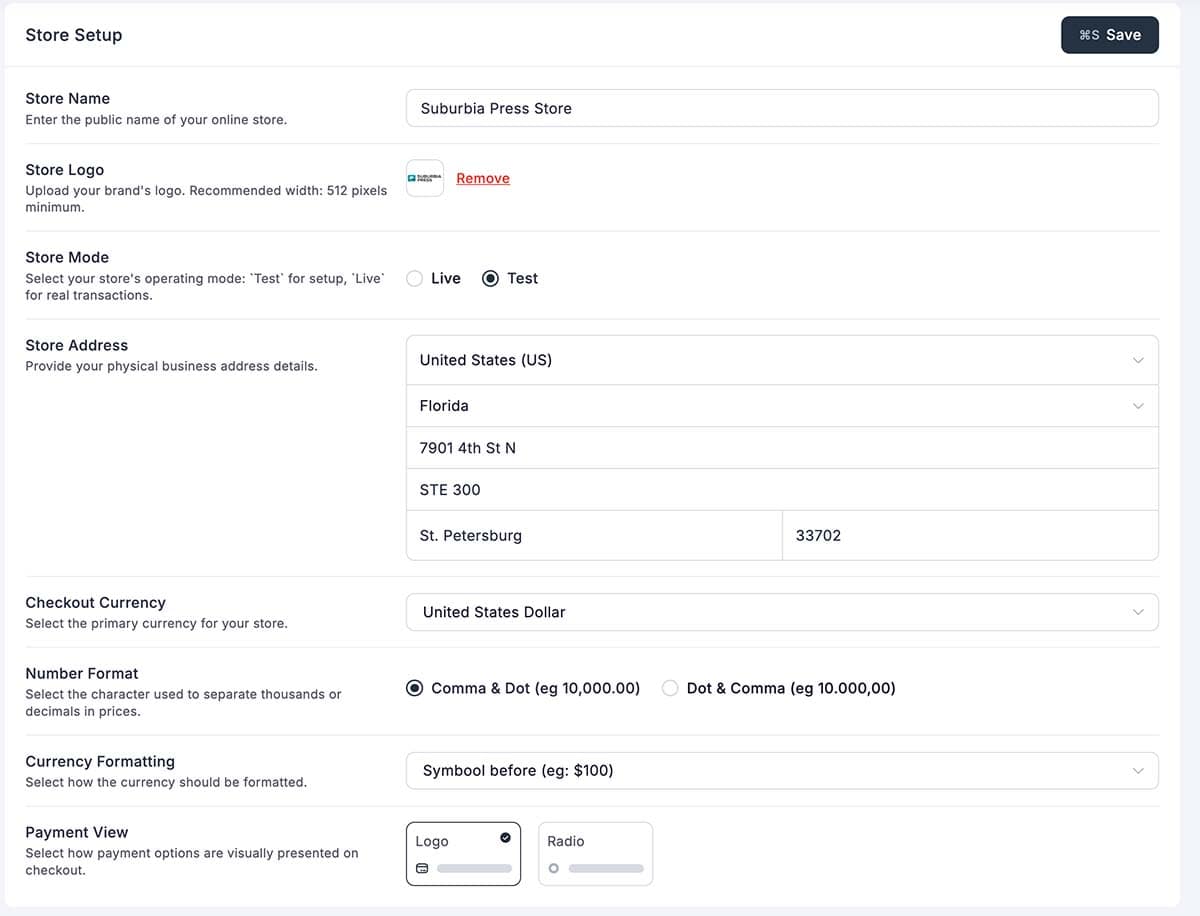
Mode – Test mode or Live mode. FluentCart defaults to test mode, which is a smart choice. You should thoroughly test everything before going live. Test mode allows you to process simulated transactions without interacting with actual payment processors.
Business Address – Country, state/province, and full address. FluentCart includes an extensive list of countries and automatically loads the appropriate state/province list based on your selection.
Currency Settings – Choose your currency from a comprehensive list (US Dollar, Euro, British Pound, and dozens more). You can also configure:
The payment view setting determines how payment methods are displayed at checkout. “Logo view” displays payment processor logos (Stripe, PayPal, etc.), while “radio view” uses simple radio buttons. I kept the default logo view as it looks more professional.
After filling in your store details, click “Save” and you’re done. Time elapsed: about 3-4 minutes.
Step 3: Add Your First Product
Now comes the fun part—adding products to sell. FluentCart gives you two options here:
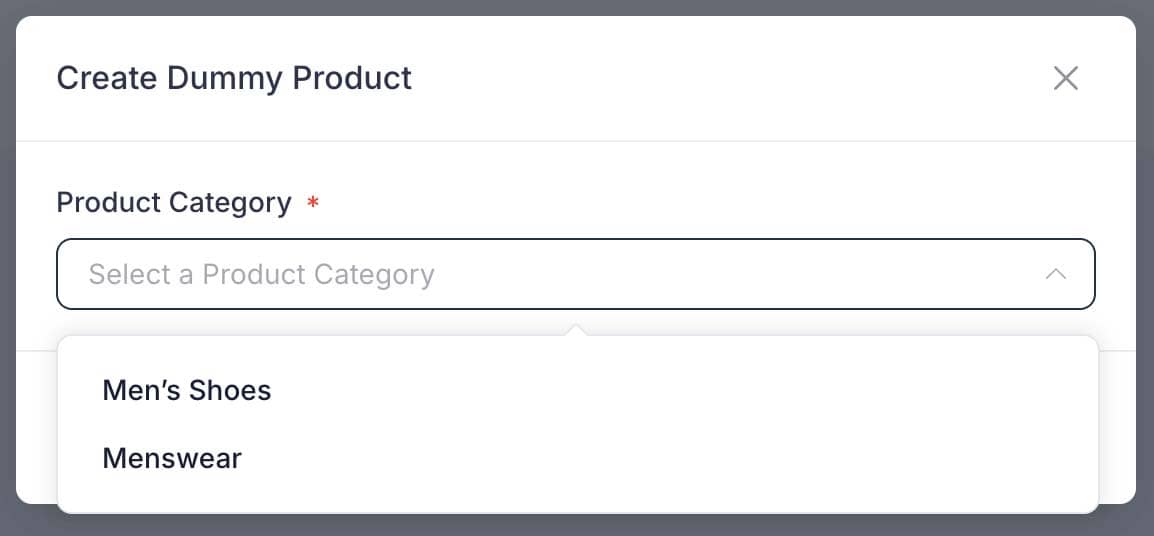
I chose the dummy product option to show you what happens. FluentCart asked me to select a product category (men’s shoes, menswear, etc.), then generated ten complete products with:
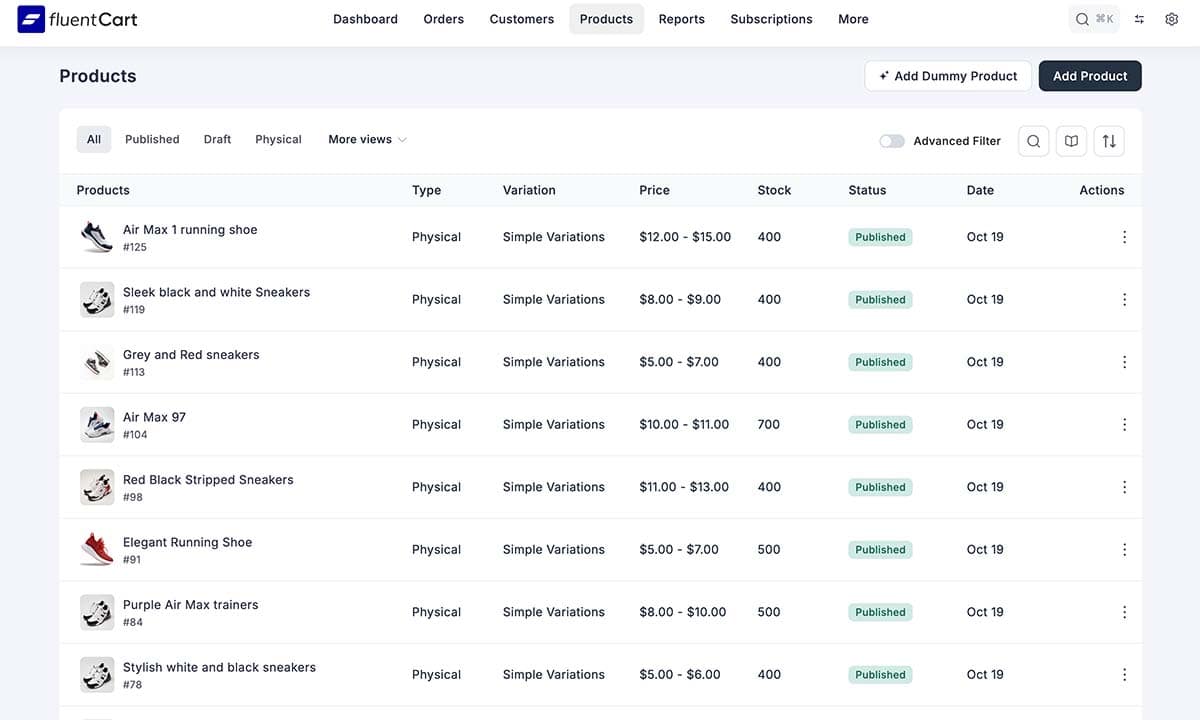
The dummy data feature is fantastic for testing. Within seconds, I had a fully populated store to experiment with—no need to manually create fake products just to see how things work.
Of course, creating a real product is equally straightforward. The product creation interface is clean and intuitive, with clear fields for:
We’ll dive deeper into product creation later in this review, but the key takeaway is this: FluentCart makes it simple whether you’re testing or building your real store.
Step 4: Set Up Payment Methods
The final setup step is configuring how you’ll accept payments. FluentCart currently offers three options:
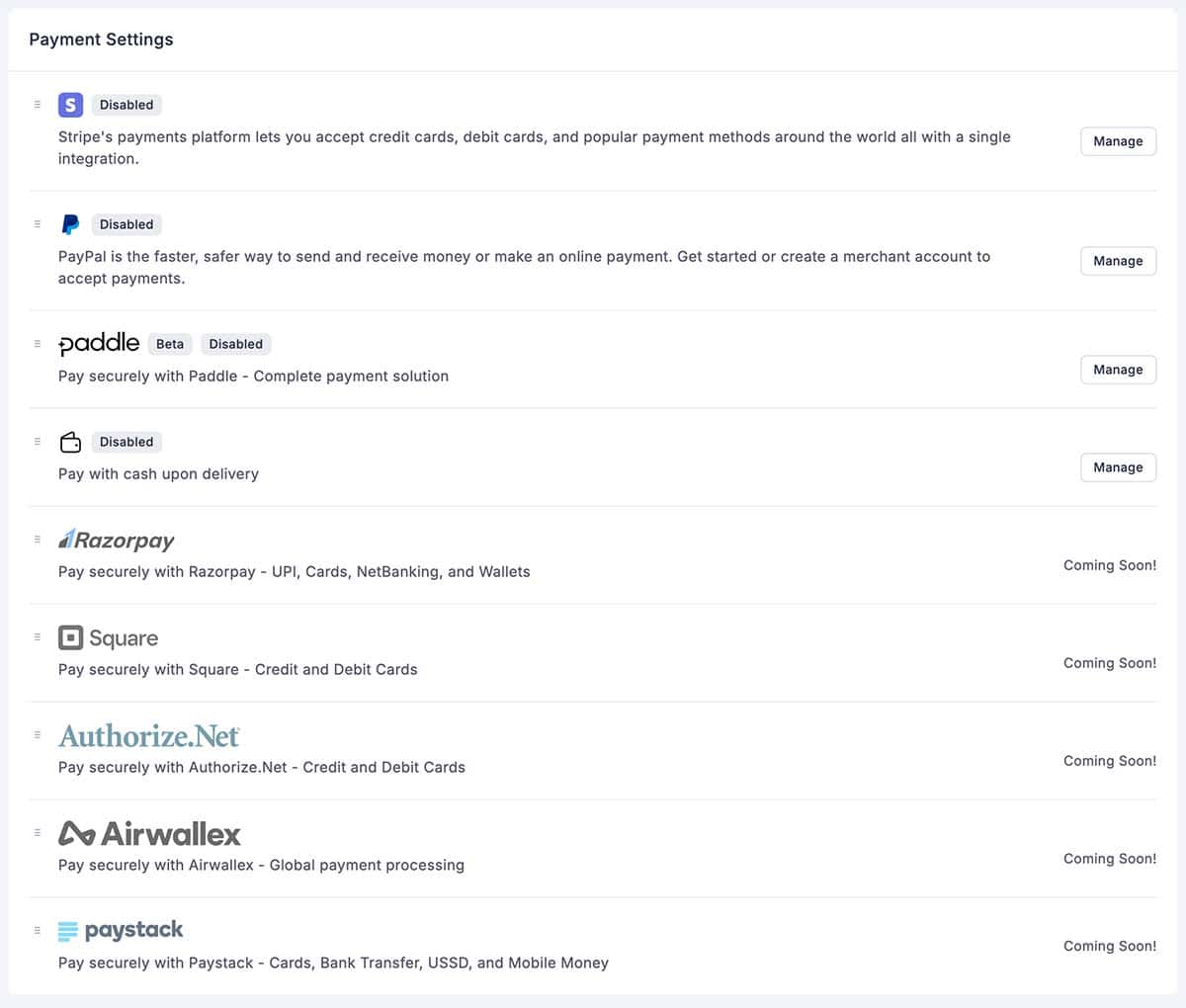
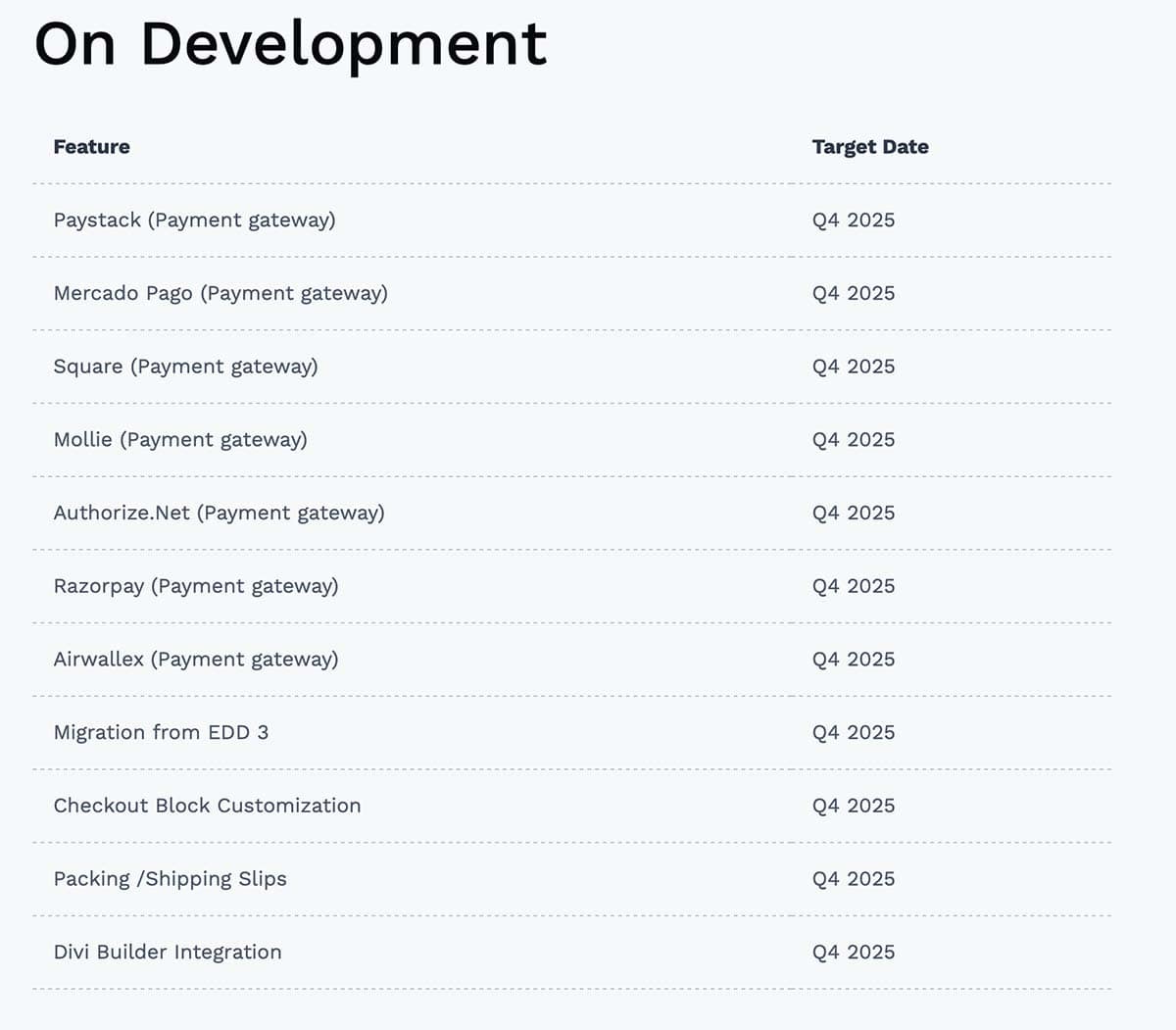
As you can see, there are several other payment providers planned for FluentCart. Expect the additional payment services by Q4 2025, per the FluentCart Development Roadmap.
Setting Up Cash on Delivery
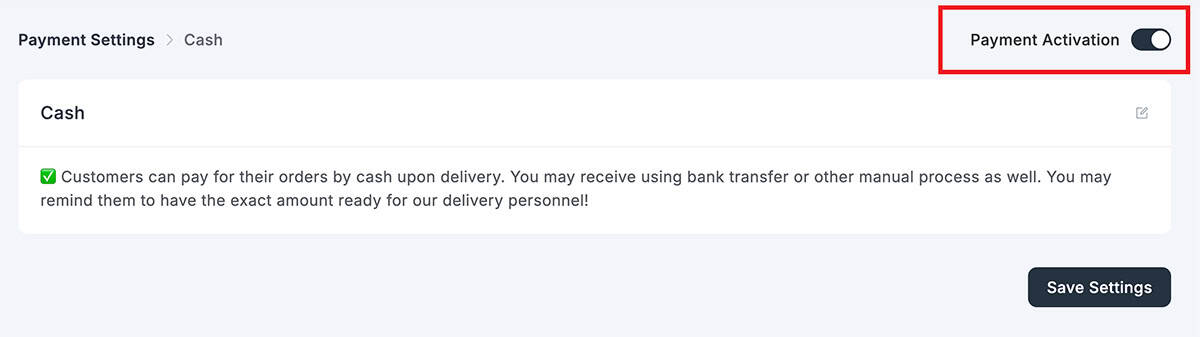
This is the simplest option: toggle it on and save. “Cash on Delivery” is FluentCart’s catch-all for any manual payment method: bank transfers, checks, invoices, or actual cash on delivery. It’s perfect for testing or if you handle payments outside the platform.
Setting Up Stripe
Stripe integration is more involved but still straightforward. Here’s the process:
- Copy the webhook URL – FluentCart provides a webhook URL you’ll need in a moment
- Connect your Stripe account – Click “Connect with Stripe” and log in with your credentials
- Configure the webhook in Stripe – FluentCart opens Stripe directly to the webhooks page and walks you through adding the endpoint
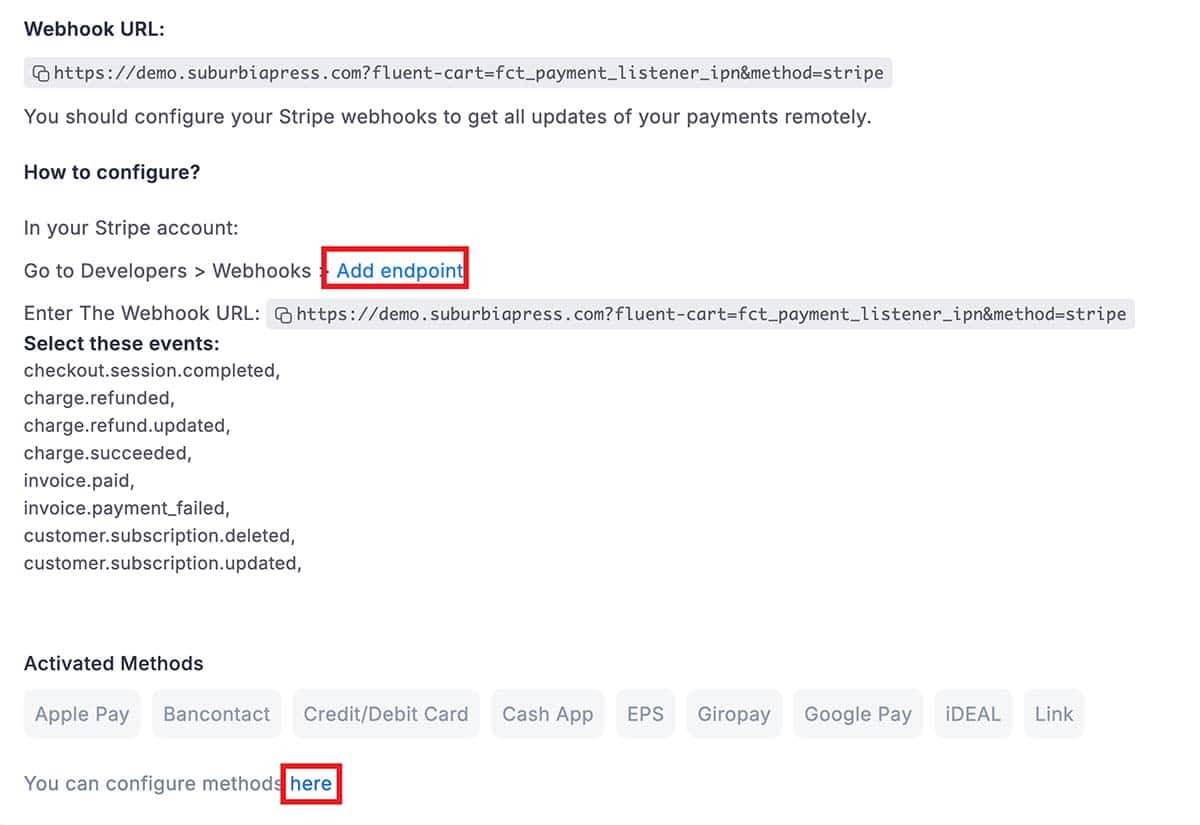
I appreciated that FluentCart links directly to the correct page in Stripe (shown above in red outline). No hunting around trying to figure out where to add webhooks. The entire Stripe setup took me about 5 minutes, including logging into my Stripe account.
The instructions are clear, and FluentCart even provides a list of the specific webhook events you need to enable:
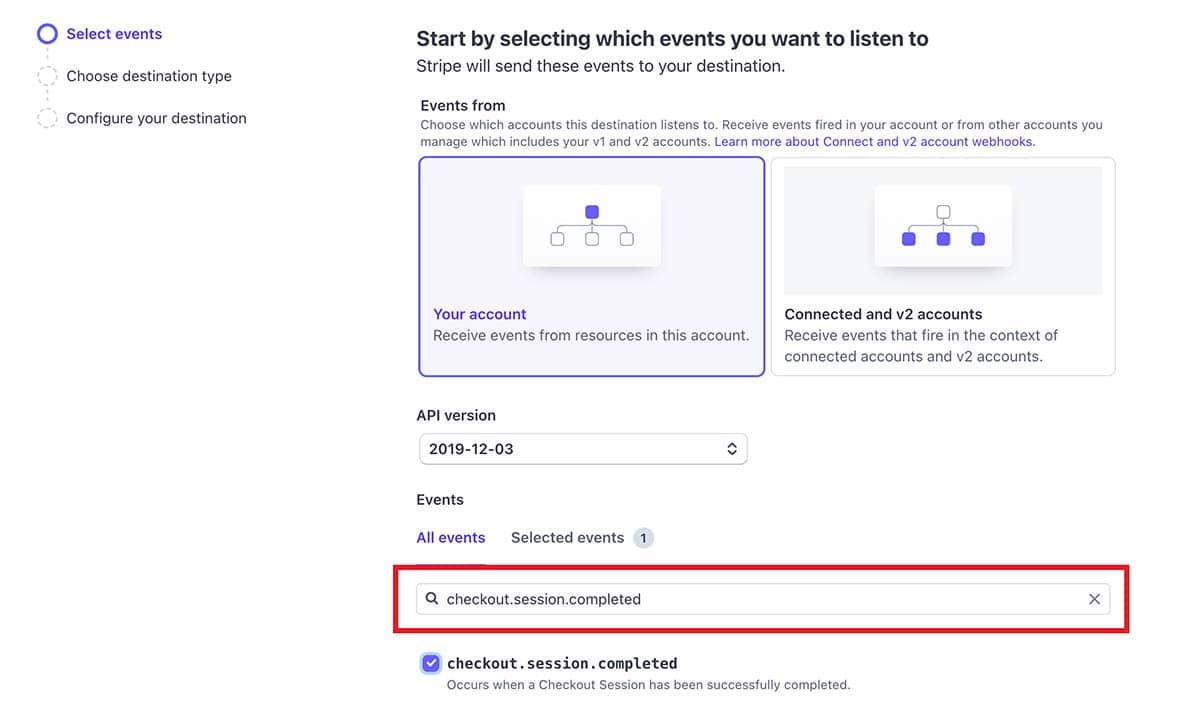
There are dozens of events, so make it easy on yourself. Copy the event you want to add from the FluentCart Stripe Setup page and paste it in the box highlighted in red. You’ll then see just that event below. Please tick the checkbox to select it. Then repeat the process for the other events. After you create your destination using the provided webhook and choose the desired events, you’re done.
Once connected, you’ll see confirmation that your Stripe account is active, along with the payment methods enabled (e.g., credit cards, Apple Pay).
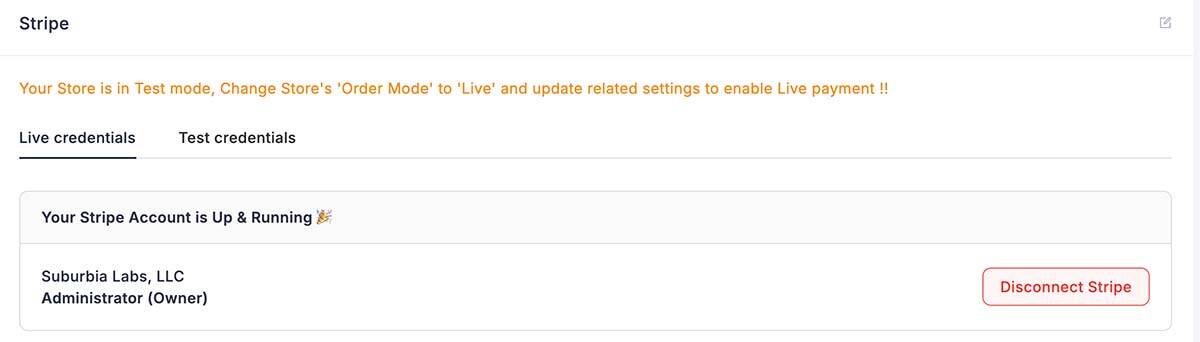
Note that you can use either Live credentials when you’re ready to accept real payments or Test credentials while testing to ensure everything works as expected. The Live or Test credentials are a part of the Stripe system. FluentCart may still be in Test mode, so you’ll need to change it to Live when you’re ready to conduct business.
Setting Up PayPal
PayPal setup follows a similar pattern to Stripe: connect your account, configure webhooks, and you’re ready to go. The process is equally well-documented within FluentCart.
Setup Complete
After completing these four steps, FluentCart’s onboarding checklist shows all items checked off. Your store is now functional and ready to accept orders.
The onboarding checklist no longer shows when all four tasks are complete.
Total time from installation to functional store: approximately 15-20 minutes.
Compare that to WooCommerce, where you’d still be researching which subscription plugin to buy and whether it conflicts with your upsell plugin.
First Impressions
The setup experience reveals a lot about FluentCart’s design philosophy:
It respects your time. There are no unnecessary steps or confusing options
It guides without constraining. You can customize everything, but sensible defaults get you moving quickly
It eliminates busywork. Automated page creation, dummy products, and integrated payment setup remove friction
It’s thoroughly modern. The interface is clean, the workflows are logical, and everything feels purpose-built for 2025
If you’ve ever fought through a WooCommerce setup, juggling plugins, sorting through dozens of settings pages, and troubleshooting conflicts, FluentCart will feel like a breath of fresh air.
Now that we’ve covered setup, let’s explore what you can actually do with FluentCart once it’s running.
Core Features
Now that your store is set up, let’s explore what FluentCart actually does. This is where you’ll see how FluentCart differs from competitors like WooCommerce. Instead of requiring a dozen separate plugins to handle subscriptions, licenses, coupons, and reporting, FluentCart includes these features out of the box.
I’ll walk you through each major feature area, showing you what works well, what’s still developing, and how it compares to other platforms.
Product Management
FluentCart handles multiple product types, each with its own configuration options and workflows.
Digital Products
Digital products are FluentCart’s bread and butter. These include eBooks, PDFs, audio files, video courses, templates, graphics, and any other downloadable content.
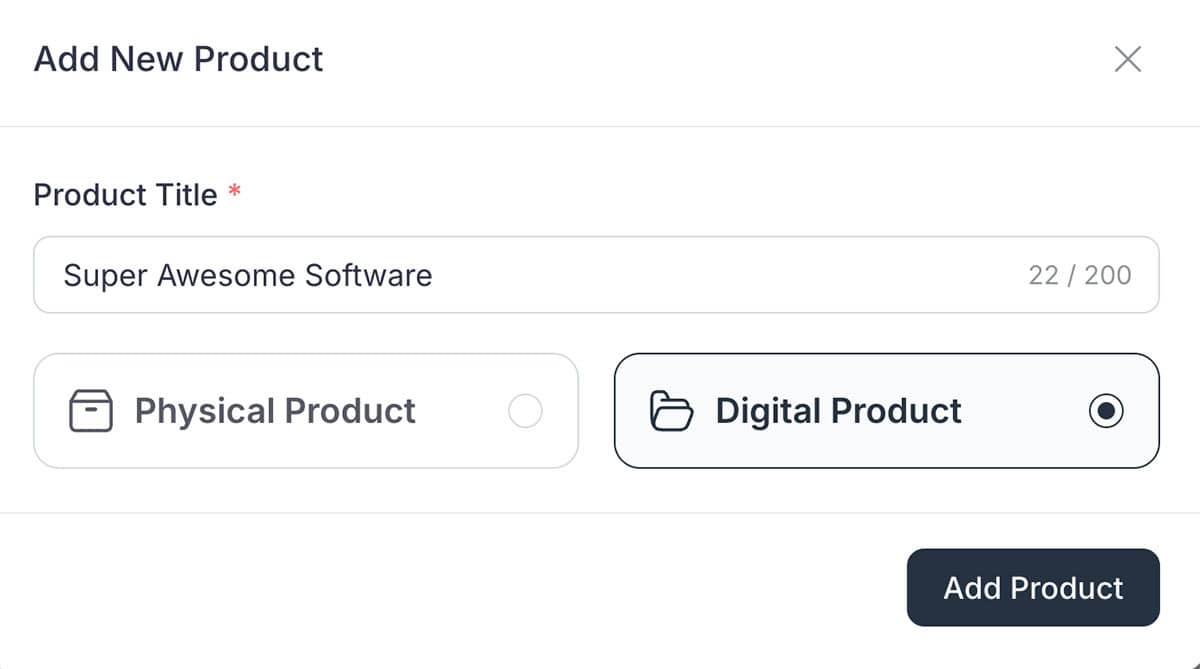
Creating a digital product is straightforward:
FluentCart handles file delivery automatically. When a customer completes their purchase, they receive immediate access to their downloads through their customer profile page. You can also set download limits (for example, allow five downloads within 30 days) to prevent abuse.
File Storage Options:
Physical Products
FluentCart supports physical products, though this is currently its weakest area. You can create physical products with:
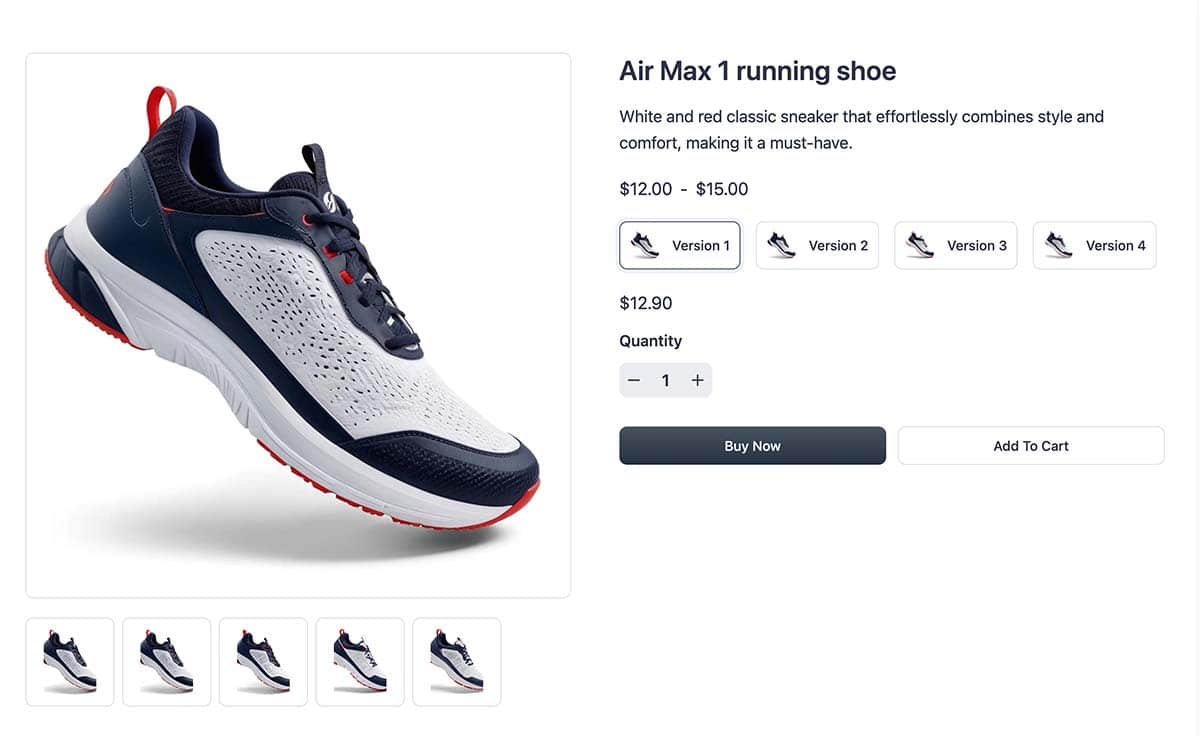
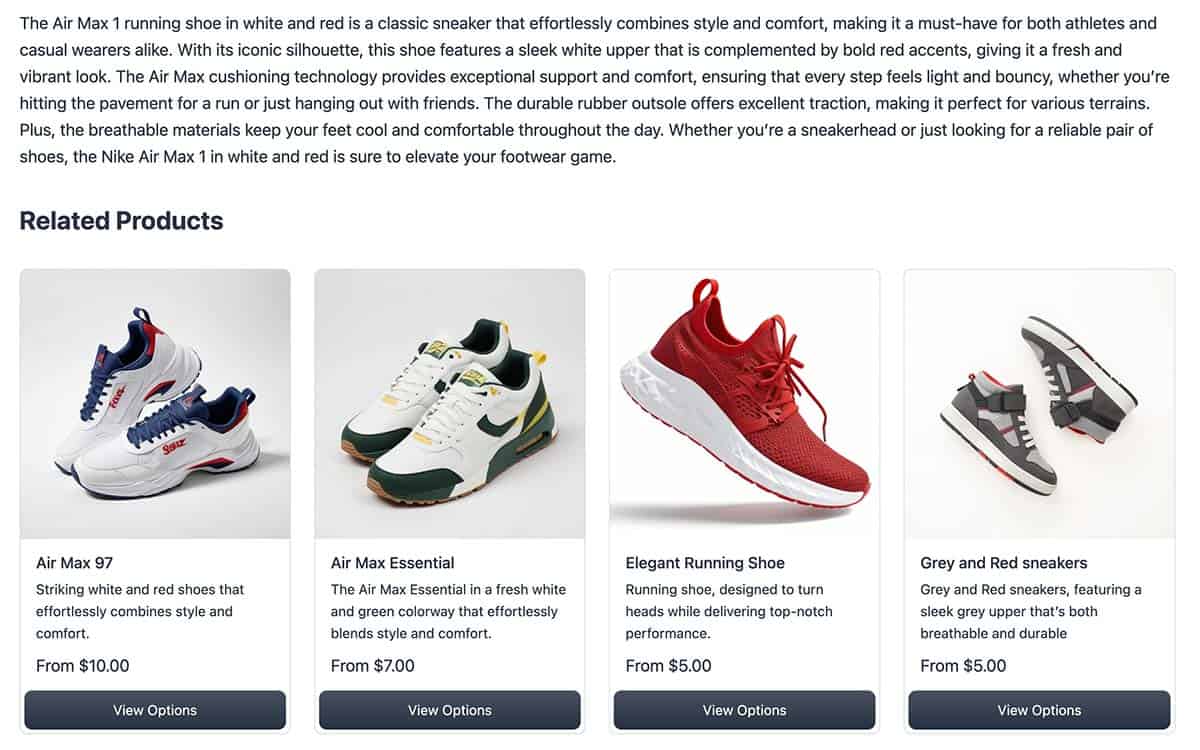
What’s Missing (Coming Soon):
If you’re running a serious physical goods store with complex shipping requirements, FluentCart may not be the right fit. However, if you sell a few physical items alongside your digital products (such as printed workbooks with a course), it handles the basics just fine.
Improvements are in the works. Integration with shipping providers is expected to be completed in Q4 2025. I have a client who needs product customization options and robust inventory management tools, so that would be nice to see added.
Subscriptions
Subscription products are where FluentCart really shines, and this is near and dear to my heart, since I operate some community sites.. Whether you’re selling membership access, recurring coaching services, or subscription software licenses, FluentCart makes it simple.
Setting the sub subscription pricing provides the following options.
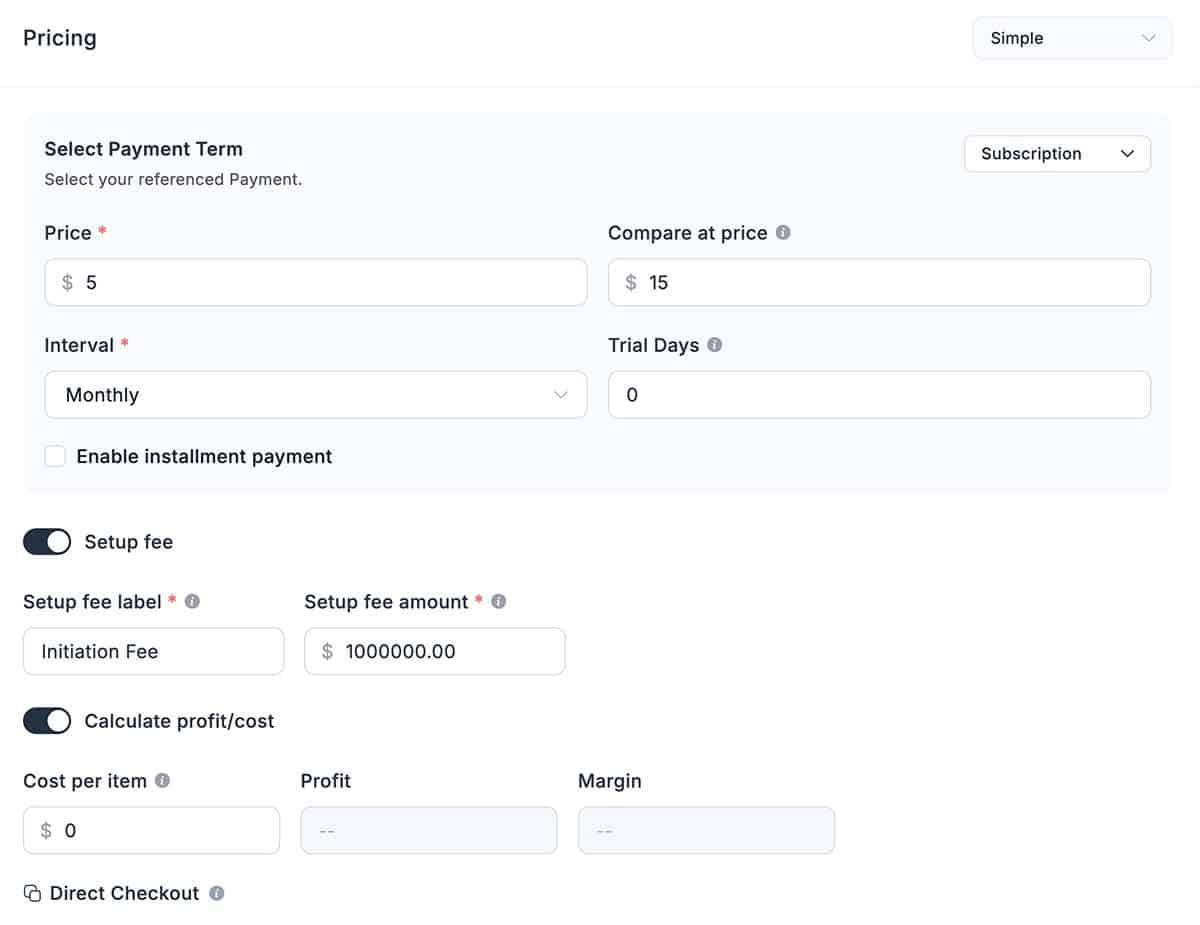
If you have tiers for your subscription plan, you can provide an easy upgrade path using a Simple Variation. Add your options as shown above. Perhaps you can create a monthly plan and an annual plan, or a lifetime subscription.
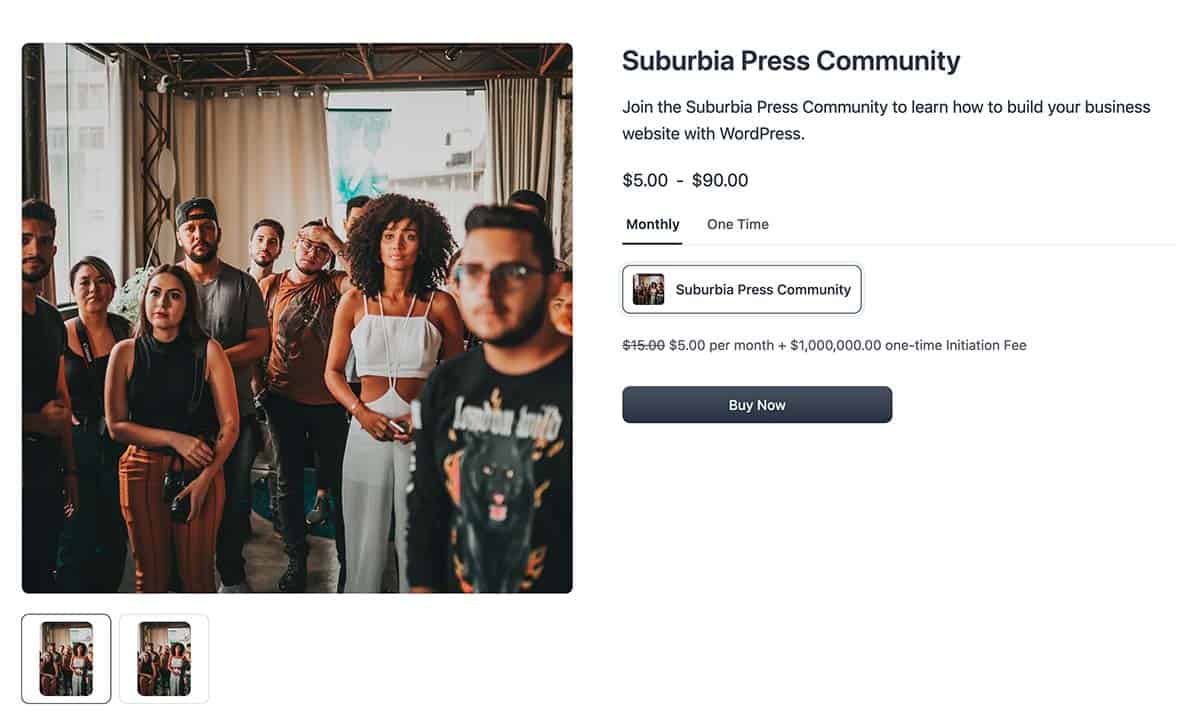
Subscription Options:
Example Use Cases:
Subscriptions integrate beautifully with Fluent CRM, so you can automatically tag customers, trigger email sequences when subscriptions are about to expire, and manage renewals through automation.
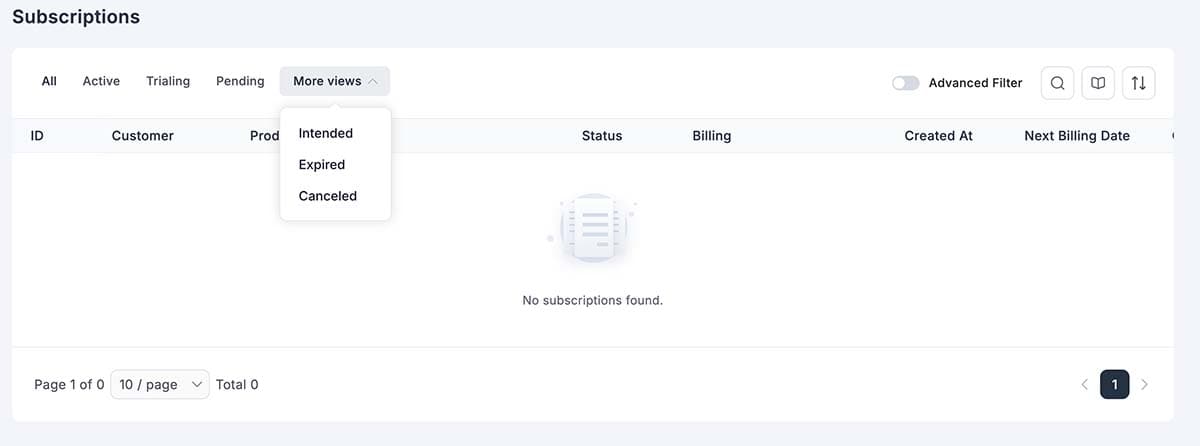
Customers can manage their own subscriptions from their profile, including:
Product Licensing
This is a killer feature for software vendors, course creators, and anyone selling products that require activation or access control. To use licenses, visit Settings > Features & Addons and toggle the option to enable Product Licensing.
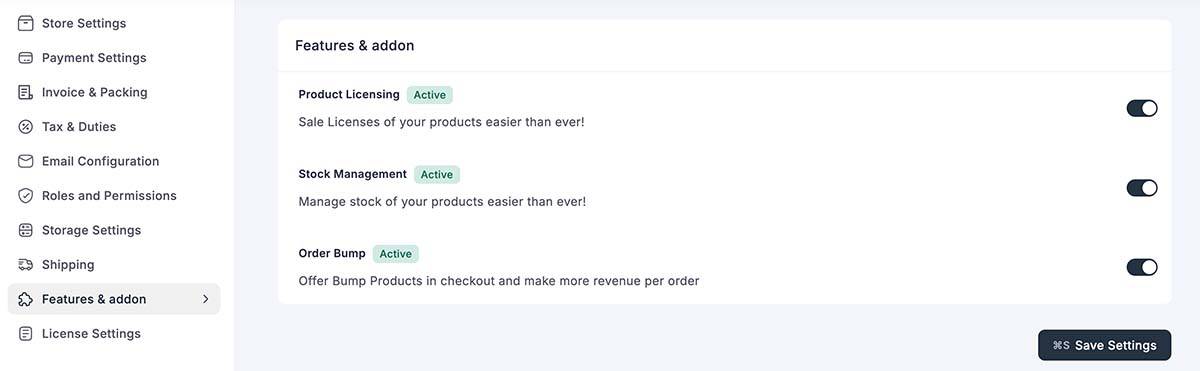
Now you have another option in your Product to enable License Settings:
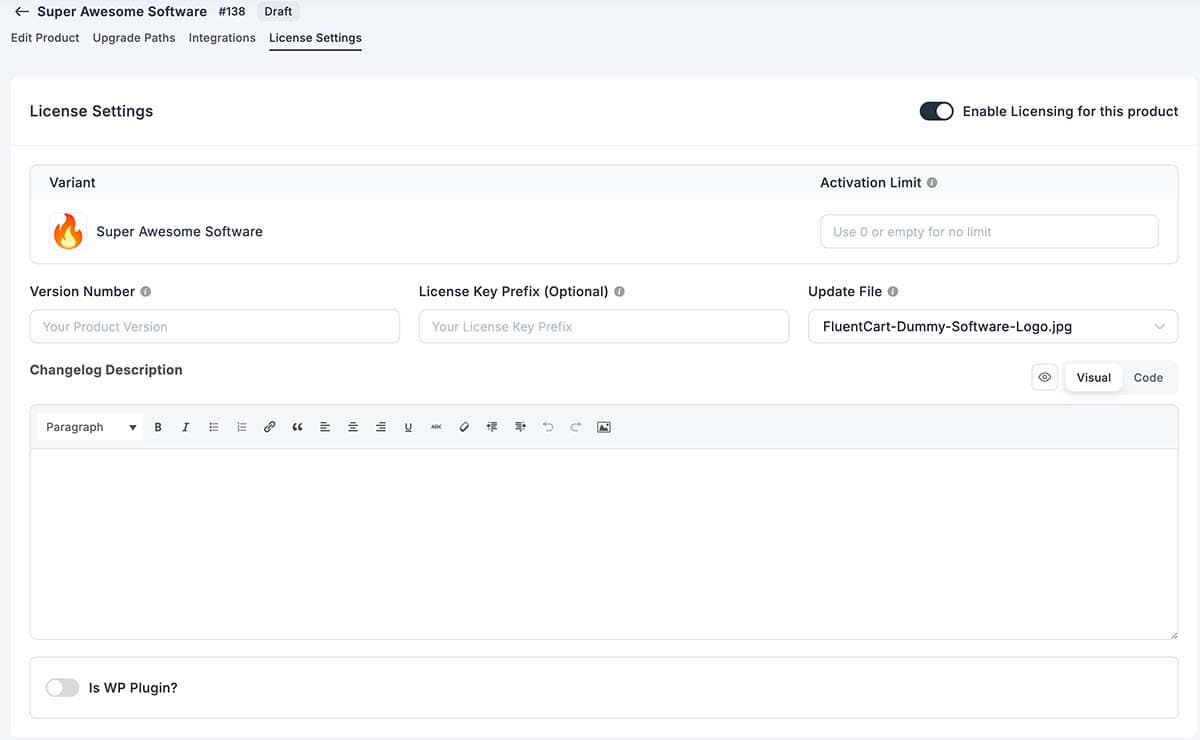
If your product is a WordPress Plugin, toggle the switch at the bottom to reveal more options.
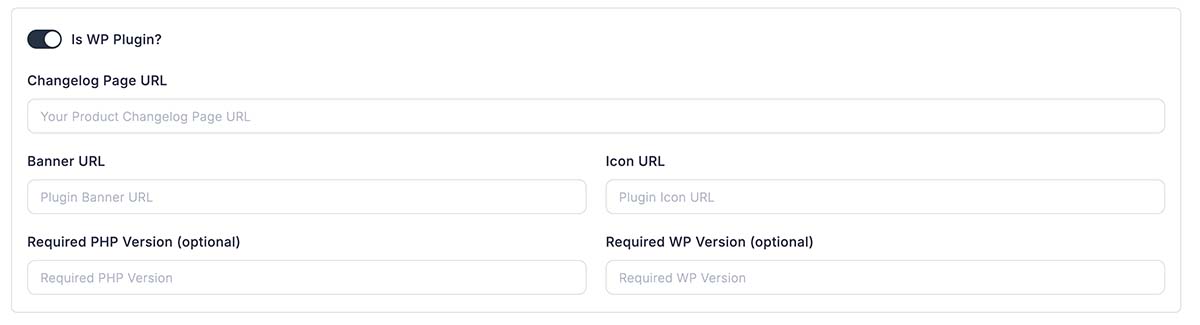
License Features:
Perfect For:
When a customer purchases a licensed product, FluentCart automatically generates their license key and displays it on their receipt and in their customer profile. You can also email the license key using customizable email templates.
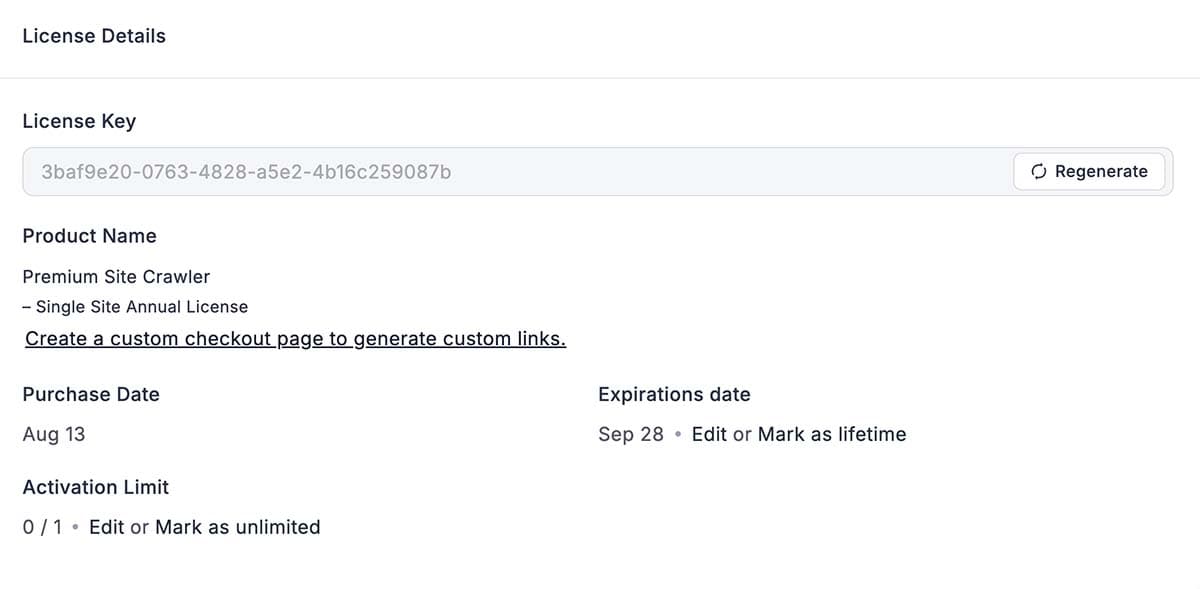
Above is the customer’s view of the license.
Product Variations
Product variations enable you to offer different options for a single product, such as various sizes, colors, or feature sets.
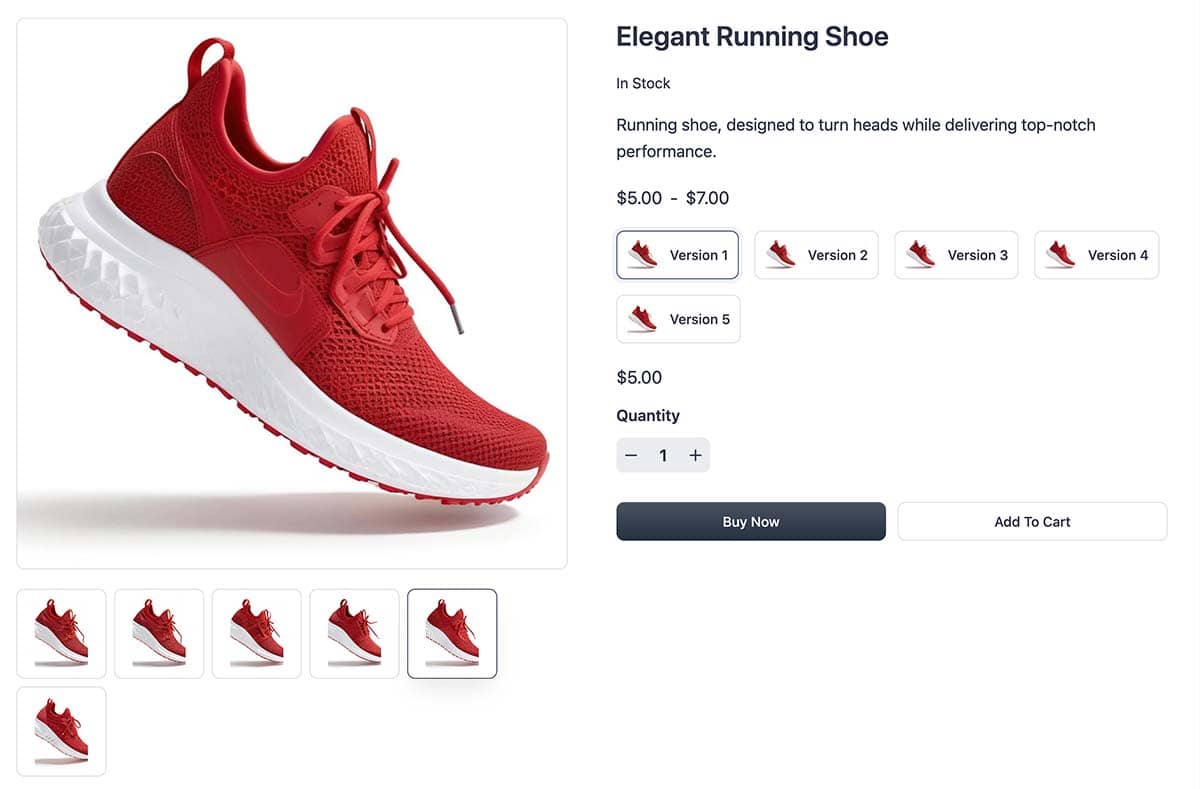
Variation Features:
Example: A hoodie product might have:
- Colors: Black, White, Navy, Crimson
- Sizes: S, M, L, XL, XXL
- Each combination has its own price and inventory count
Customers select their preferred variation at checkout, and FluentCart tracks everything separately in your inventory and reporting.
Sales Tools
FluentCart features several enhancements designed to boost revenue and streamline your sales funnel.
Order Bumps
Order bumps appear at checkout, offering customers a complementary product they can add with a single click. This is one of the easiest ways to increase average order value.
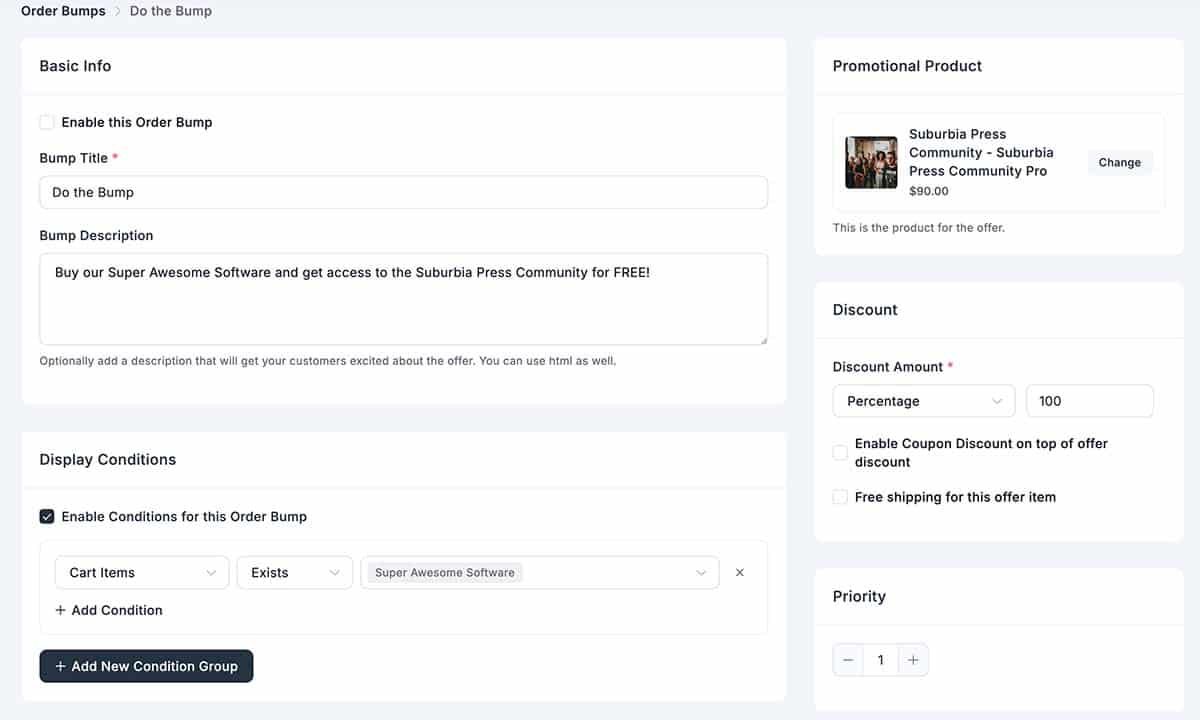
To use an Order Bump, first visit Settings > Features & Add-ons to enable it.
Order Bump Settings:
Example: A customer is purchasing your $97 course. At checkout, they see: “Add the companion workbook for just $17 more!” With just one click, it’s added to their order.
In the example above, I’m granting Community Access to anyone who purchases the software.
Order bumps typically convert at a rate of 10-30%, making them incredibly effective for boosting revenue without requiring additional traffic.
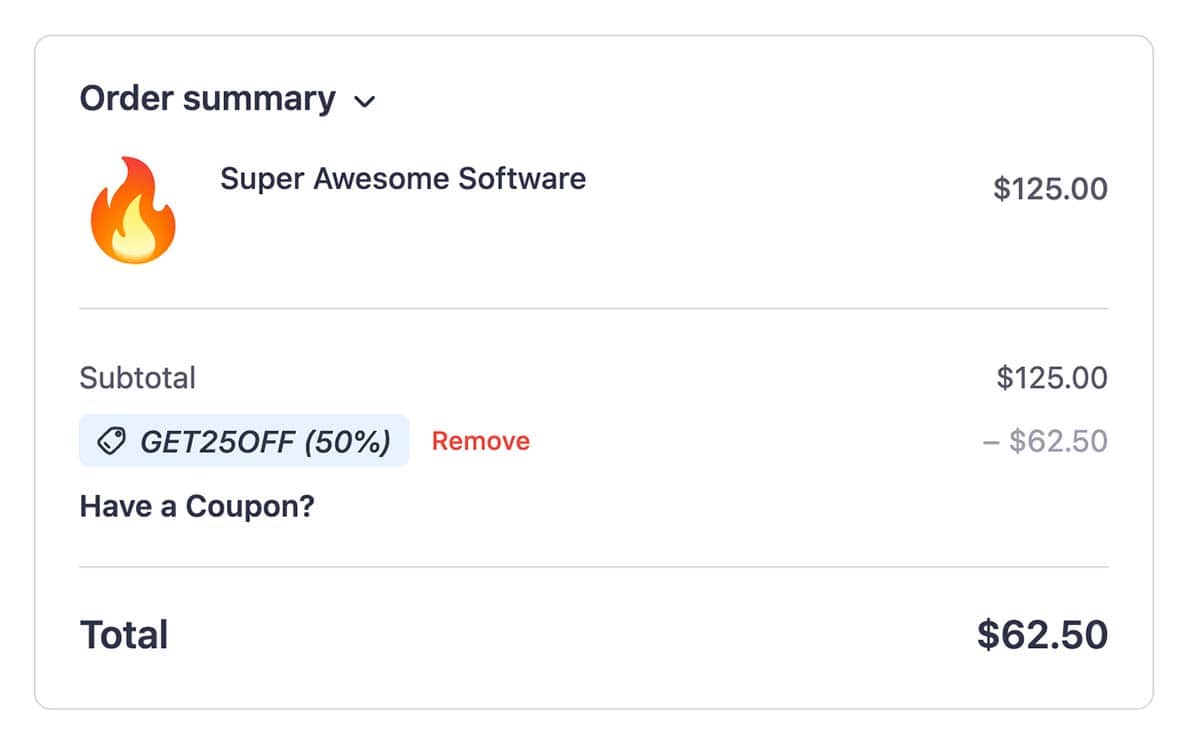
Coupons
FluentCart’s coupon system is robust and flexible, with features that often require paid extensions in WooCommerce. There are numerous benefits to using coupons in your e-commerce store.
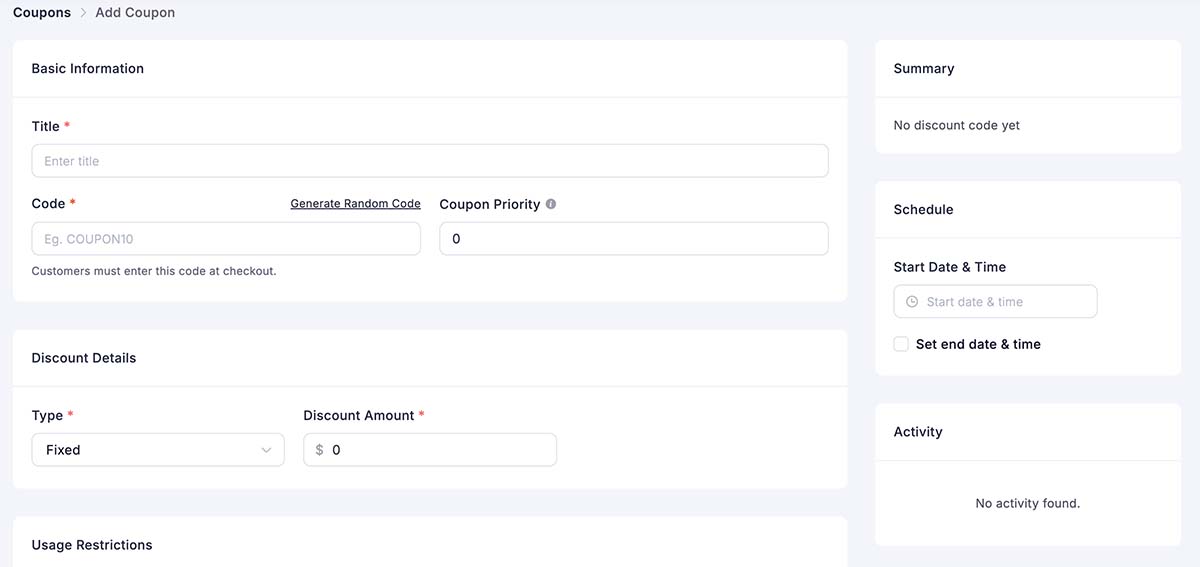
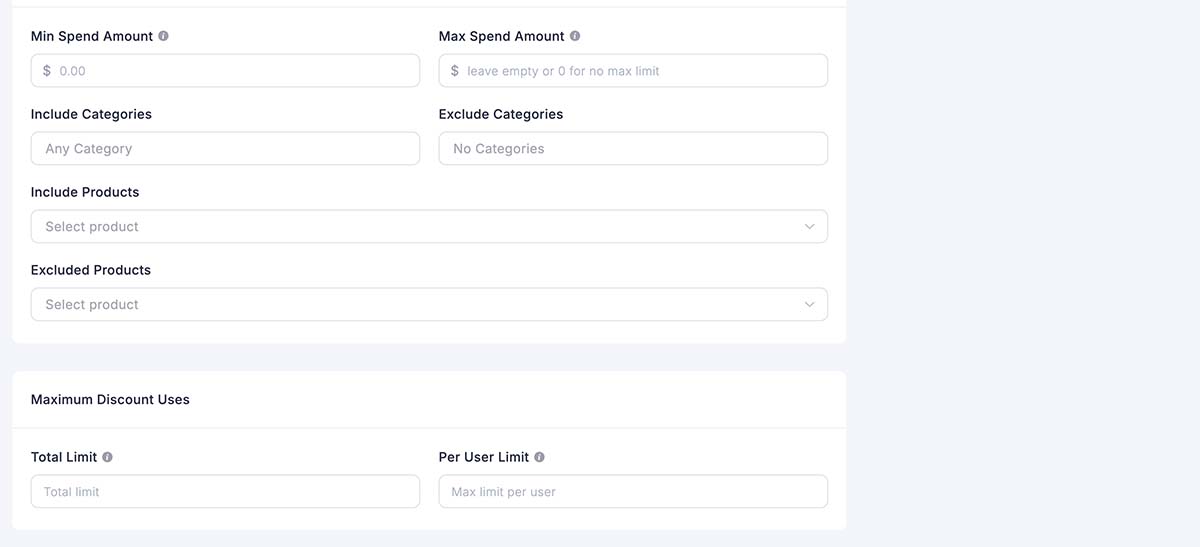
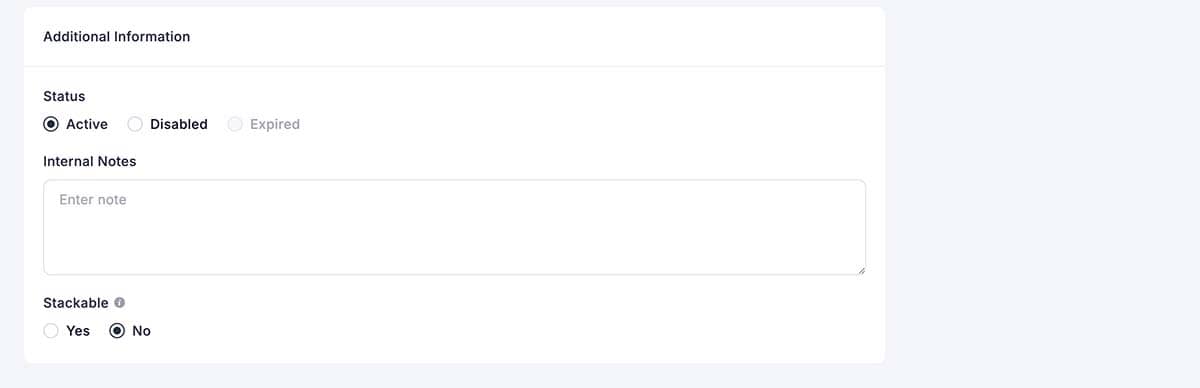
Offering coupons helps ecommerce owners increase conversions, attract and retain customers, manage inventory, enhance marketing performance, and gather valuable data, all while reinforcing customer loyalty and satisfaction.
Coupon Features:
Advanced Options:
You can also hide the coupon field at checkout to prevent customers from abandoning their cart to search for coupon codes online.
Upsells and Downsells (Coming Q4 2025)
While not available at launch, upsells and downsells are currently in active development and are expected to be available by the fourth quarter of 2025.
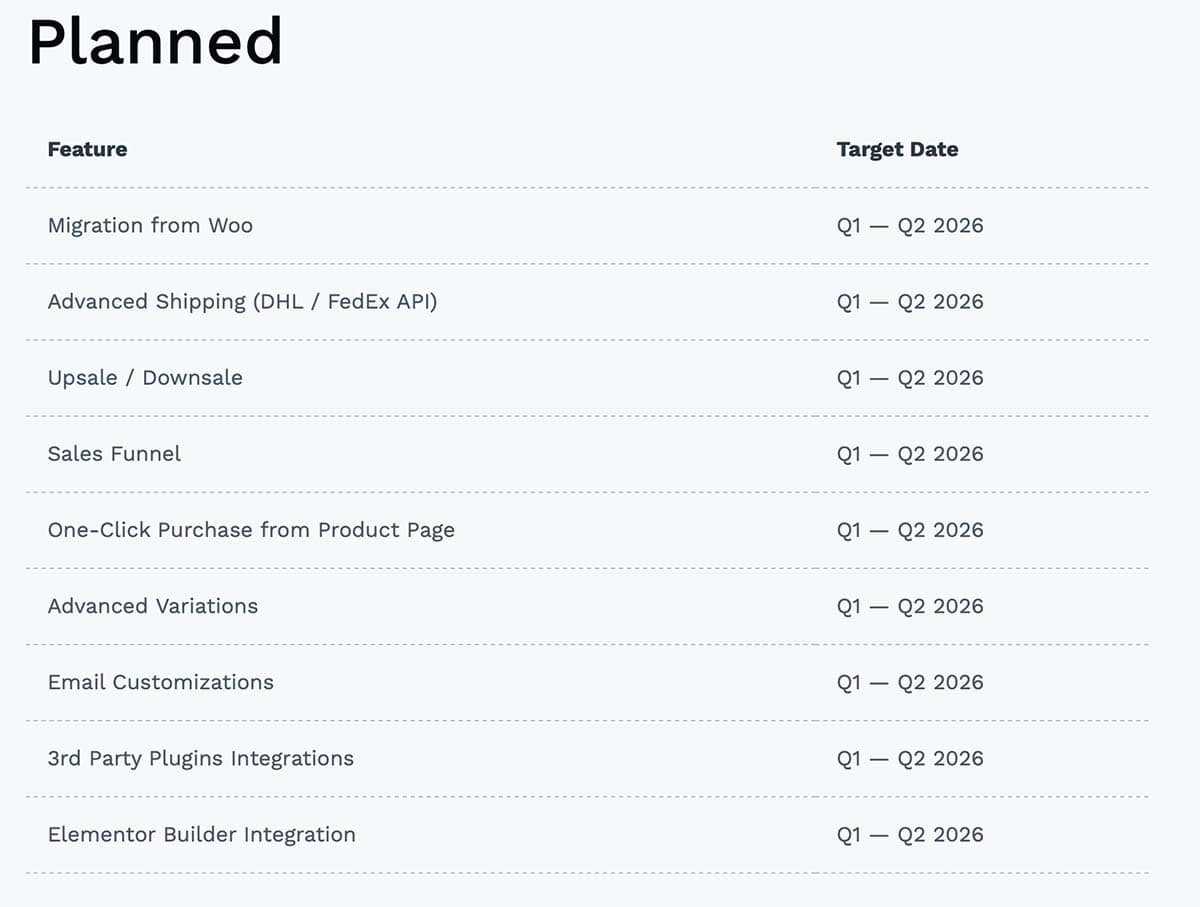
See the list of Planned Features below.
Customer Management
FluentCart gives you complete visibility into your customer base and their purchase history.
Customer Profiles/Accounts
Every customer gets a detailed profile that tracks:
This is what the customer’s account looks like when they log in. Some details may depend on additional integrations, such as Fluent Support, FluentAffiliate, or FluentCRM.
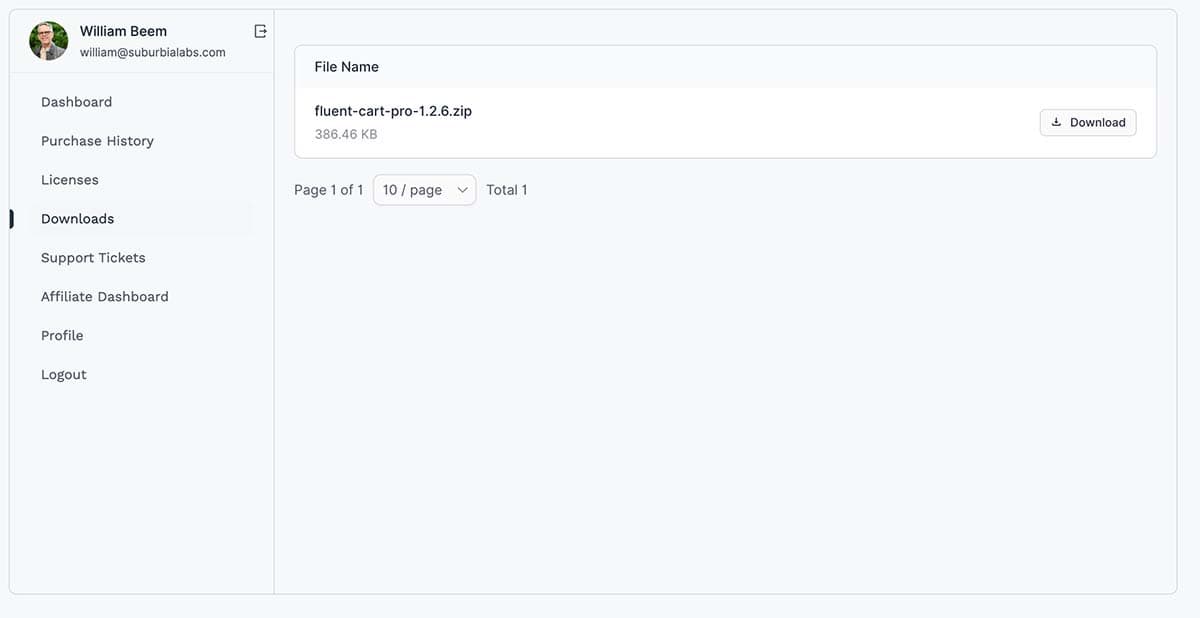
This is the admin view of a customer profile.
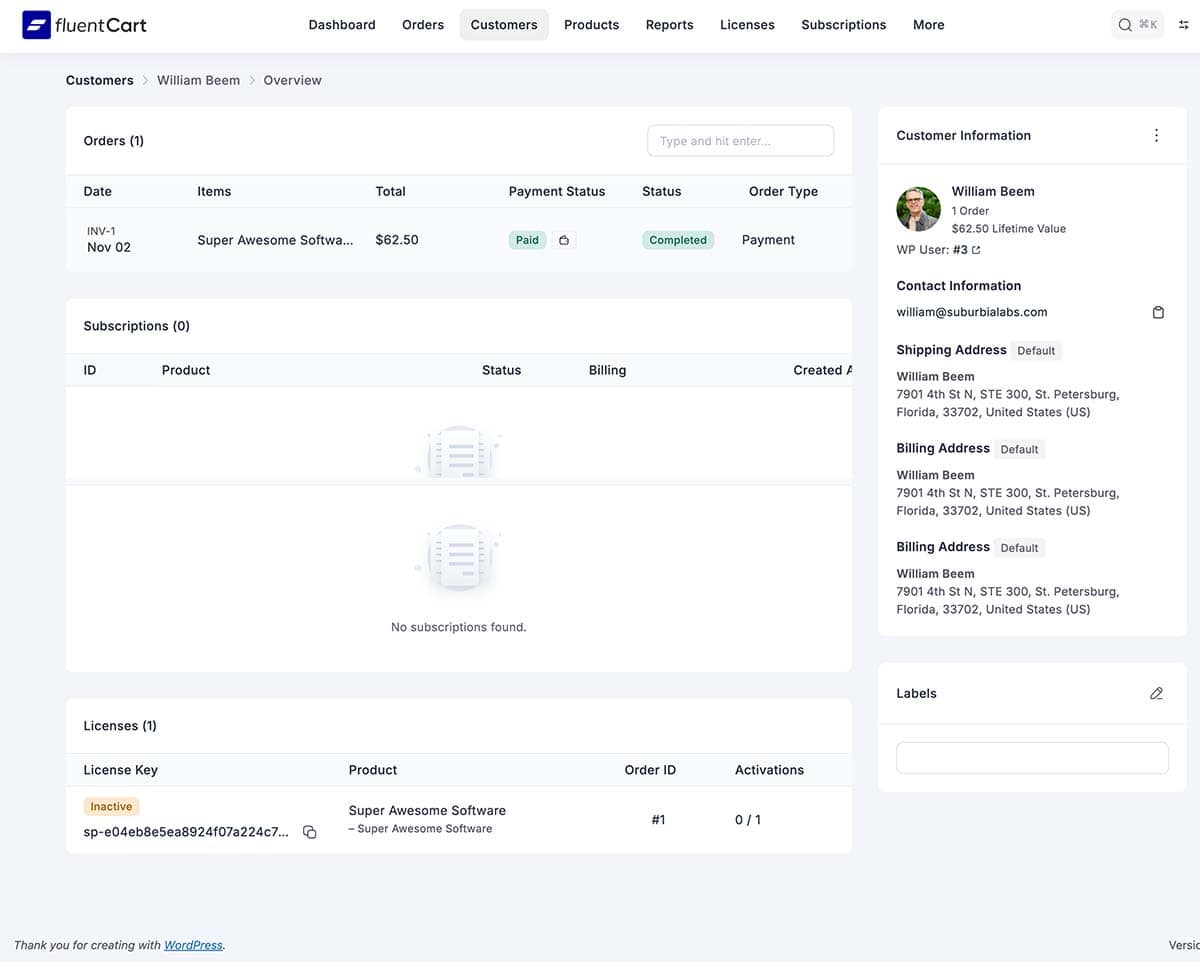
You can add internal notes to customer profiles, manually create orders on their behalf, and view their entire relationship with your store at a glance.
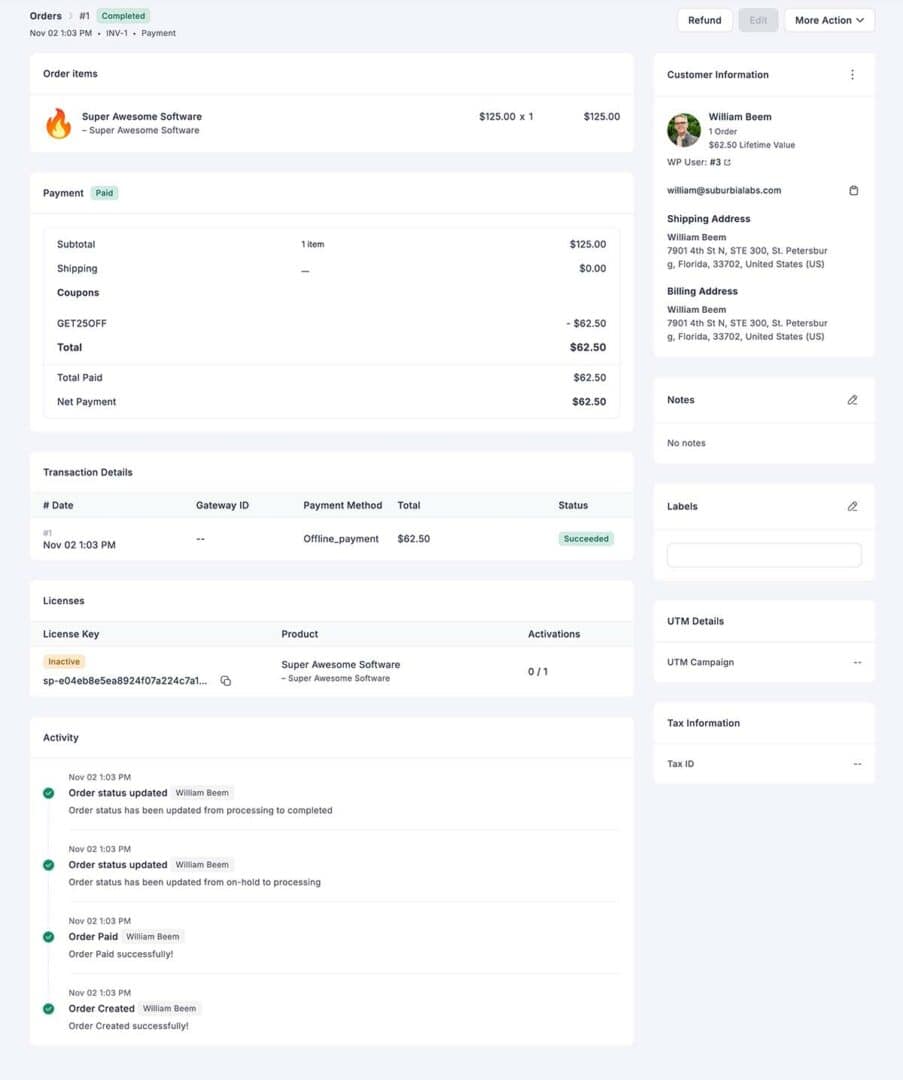
Here’s a view of a customer order from the backend admin panel.
Reporting & Analytics
One of FluentCart’s most impressive features is its reporting system. While WooCommerce requires multiple paid extensions to get comprehensive analytics, FluentCart includes powerful reporting tools right out of the box. If you’ve ever paid for analytics plugins or struggled with basic WordPress eCommerce reports, you’ll appreciate what FluentCart offers.
Let me show you what kind of insights you can extract from your store data.
Dashboard Overview
The main dashboard presents essential metrics at a glance. No need to dig through multiple pages to understand how your business is performing.
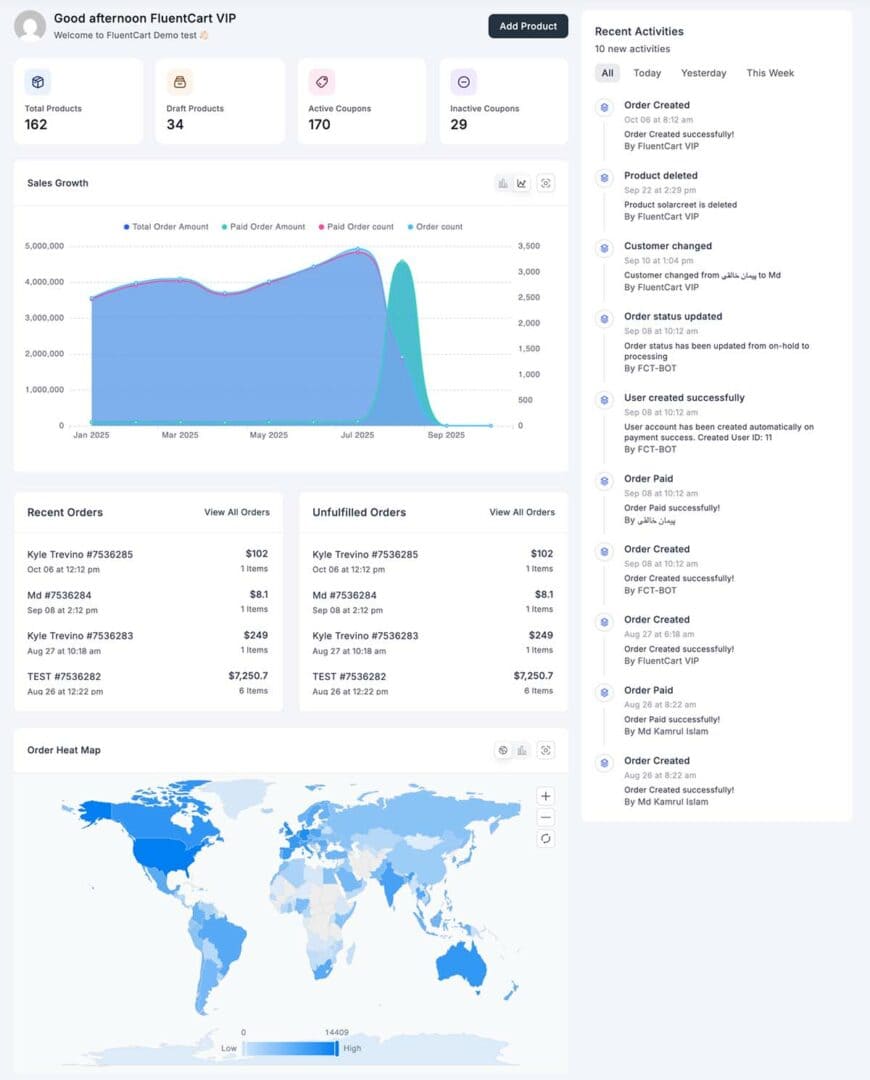
Key Metrics Displayed:
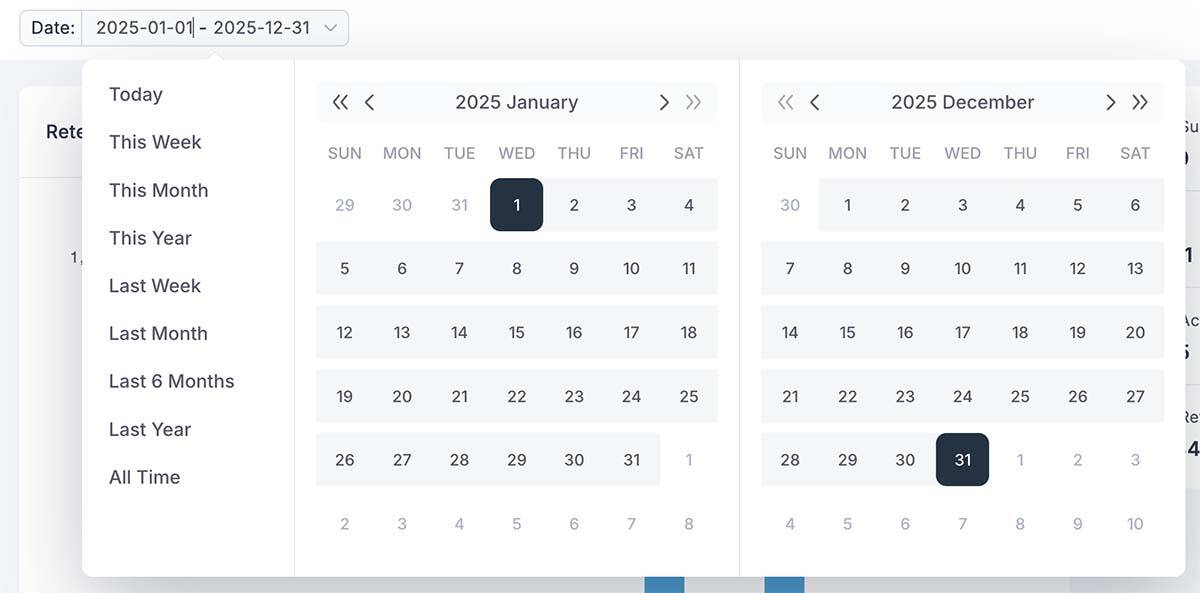
The dashboard also shows recent orders in real-time, giving you immediate visibility into what’s selling. You can filter everything by date range using quick links (today, this week, this month, this year) or set custom date ranges for deeper analysis.
Below is a view of the Year-to-Date Sales report.
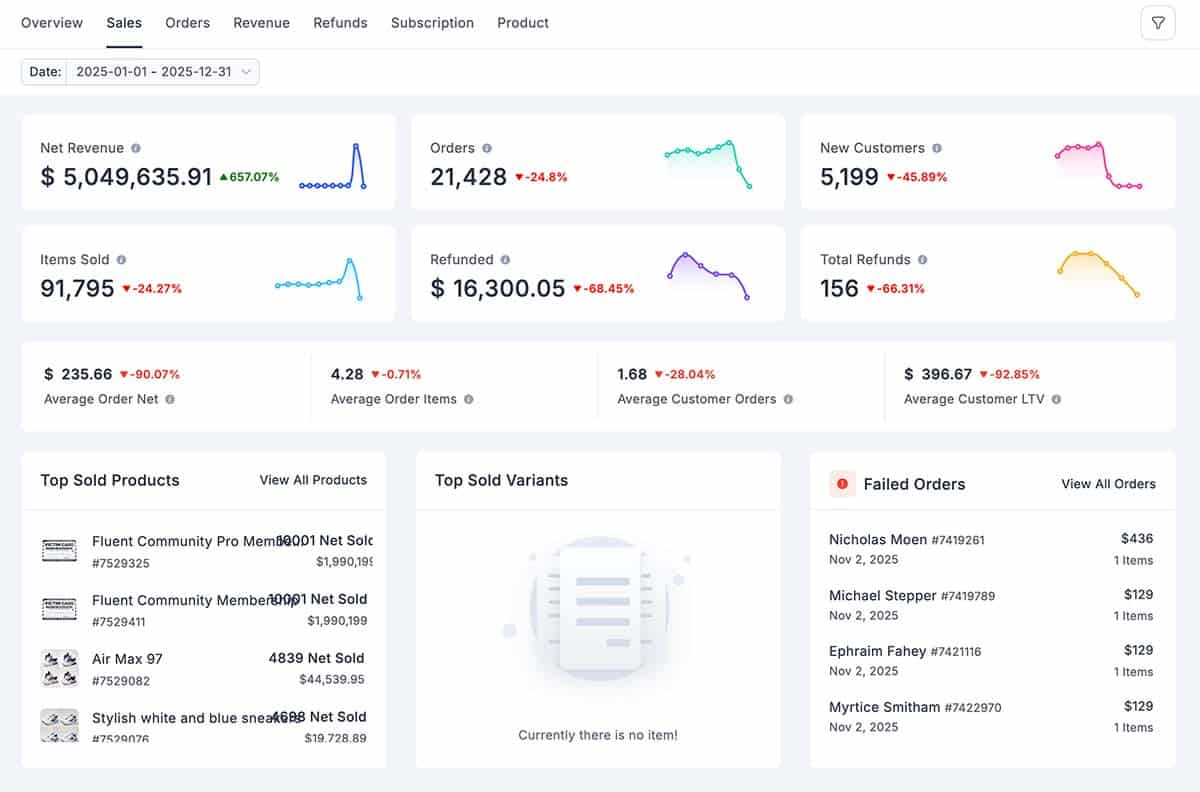
You have a great deal of flexibility to select date ranges for your reports. Below is a look at the date range picker.
What I appreciate most is the clean, uncluttered design. The information you need is right there, without overwhelming you with charts and numbers that don’t matter.
Seasonal Trends
By comparing data across months and years, you can identify seasonal patterns:
Real-Time Updates
Unlike some platforms where reports run overnight, FluentCart reports update in real-time. Make a sale, refresh your dashboard, and see it immediately reflected in your metrics.
This real-time visibility is invaluable during:
Mobile-Friendly Reports
All reports are responsive and work well on mobile devices. Check your numbers from your phone while traveling or away from your desk.
What’s Missing (For Now)
To be fair, FluentCart’s reporting isn’t perfect. Here are some features I’d like to see added:
These are nice-to-haves rather than deal-breakers, and given FluentCart’s rapid development pace, I expect many of these features will be introduced in future updates.
How FluentCart Reporting Compares
vs. WooCommerce
Out of the box, WooCommerce’s reporting is basic. You get simple sales reports and little else. To match FluentCart’s reporting, you’d need to purchase extensions like:
FluentCart includes much more than WooCommerce from day one without additional cost, and there’s more development in the works.
vs. Shopify
Shopify’s basic plan offers limited reporting capabilities. To get detailed analytics, you need the Shopify plan ($105/month) or higher. Even then, some advanced reports require the Advanced Shopify plan ($399/month).
Here is the current pricing from the Shopify website.
FluentCart’s reporting rivals Shopify’s mid-tier plans, included in your one-time purchase.
The Bottom Line on Reporting
FluentCart’s reporting and analytics are genuinely impressive for a new platform. You get insights that would cost hundreds of dollars monthly on other platforms, all included in your one-time purchase.
The reports are:
For digital entrepreneurs seeking to make data-driven decisions without incurring the costs of expensive analytics tools, FluentCart delivers exceptional value.
If you’re currently using WooCommerce and paying for reporting extensions, FluentCart’s built-in analytics alone could make the switch worthwhile.
Design & Customization
One concern many people have when switching to a new eCommerce platform is flexibility. Will you be locked into a specific design? Can you make your store look professional? Does it work with your existing theme and page builder?
FluentCart takes a refreshingly flexible approach to design. Rather than forcing you into rigid templates, it provides you with the tools to create the exact shopping experience you want.
Theme Compatibility
FluentCart is completely theme-agnostic, meaning it works with virtually any WordPress theme.
In every case, FluentCart integrated smoothly without breaking layouts or causing conflicts. The plugin doesn’t force its own styling onto your site. Instead, it inherits your theme’s typography, colors, and general design aesthetic.
FluentCart works well with Gutenberg Blocks. Some themes have special features for WooCommerce, but that’s not the case with FluentCart. It’s best not to force your theme on FluentCart functions, but rather use it (and blocks) to accentuate the pages using FluentCart Shortcodes.
How It Works
FluentCart uses shortcodes to insert shop functionality into your pages. Each shortcode renders content that respects your theme’s styling while adding FluentCart-specific elements where needed.
Core Shortcodes:
You create a page, add the shortcode, and FluentCart handles the rest. The content area displays FluentCart functionality, while your theme determines your header, footer, sidebar, and overall page structure.
This approach means:
Beyond themes, FluentCart integrates with major WordPress page builders, providing you with drag-and-drop control over your shop design.
Currently Supported Builders
Coming Soon
Divi – Official Divi support is planned. While you can use shortcodes in Divi now, dedicated Divi modules are in development for a more native experience.
Other Builders – As FluentCart grows, expect support for additional builders based on community demand.
Design Freedom
The page builder compatibility means you can:
You’re not limited to a single template. Each page can have its own design while maintaining FluentCart functionality.
Design Best Practices
Based on my testing, here are some design recommendations:
The Bottom Line on Design
FluentCart strikes a good balance between flexibility and simplicity. You have enough customization options to create a professional, branded shopping experience without being overwhelmed by choices.
If you’re coming from a highly customized WooCommerce setup with premium themes and extensive design work, you might find FluentCart’s options somewhat limited. However, for most digital entrepreneurs, the available customization options are more than sufficient.
The real strength is that FluentCart doesn’t fight your theme. It integrates smoothly, looks professional by default, and lets you focus on selling rather than endless design tweaking.
For someone who wants a visually appealing store that works seamlessly, FluentCart delivers. For someone who needs pixel-perfect control over every element, you might need to add custom CSS or wait for more advanced design features in future updates.
Integrations
One of the most critical questions when evaluating any eCommerce platform is: “What does it connect with?” The power of integrations can make or break your business workflow, especially if you’re already using other tools for email marketing, customer management, or business automation.
FluentCart takes an interesting approach to integrations. Rather than attempting to connect with hundreds of third-party services immediately, it focuses on deep, native integration with the Fluent ecosystem, while providing flexible options for connecting other tools. It also provides webhooks to connect with a variety of apps, either directly or through services like Make, Zapier, etc.
Let me show you what’s available now and what’s coming.
Native Fluent Ecosystem Integration
If you’re already using WP Manage Ninja products, the FluentCart integration is seamless and powerful. This is where FluentCart truly shines.
Fluent CRM Integration
Fluent CRM is a self-hosted email marketing and CRM platform for WordPress. The integration between FluentCart and Fluent CRM is incredibly tight, enabling sophisticated automation without any third-party connectors. You don’t have to do anything when both plugins are installed on the same site. They automatically integrate.
Click here to see my review of FluentCRM.
Here are the Triggers from FluentCart that initiate an Automation in FluentCRM.
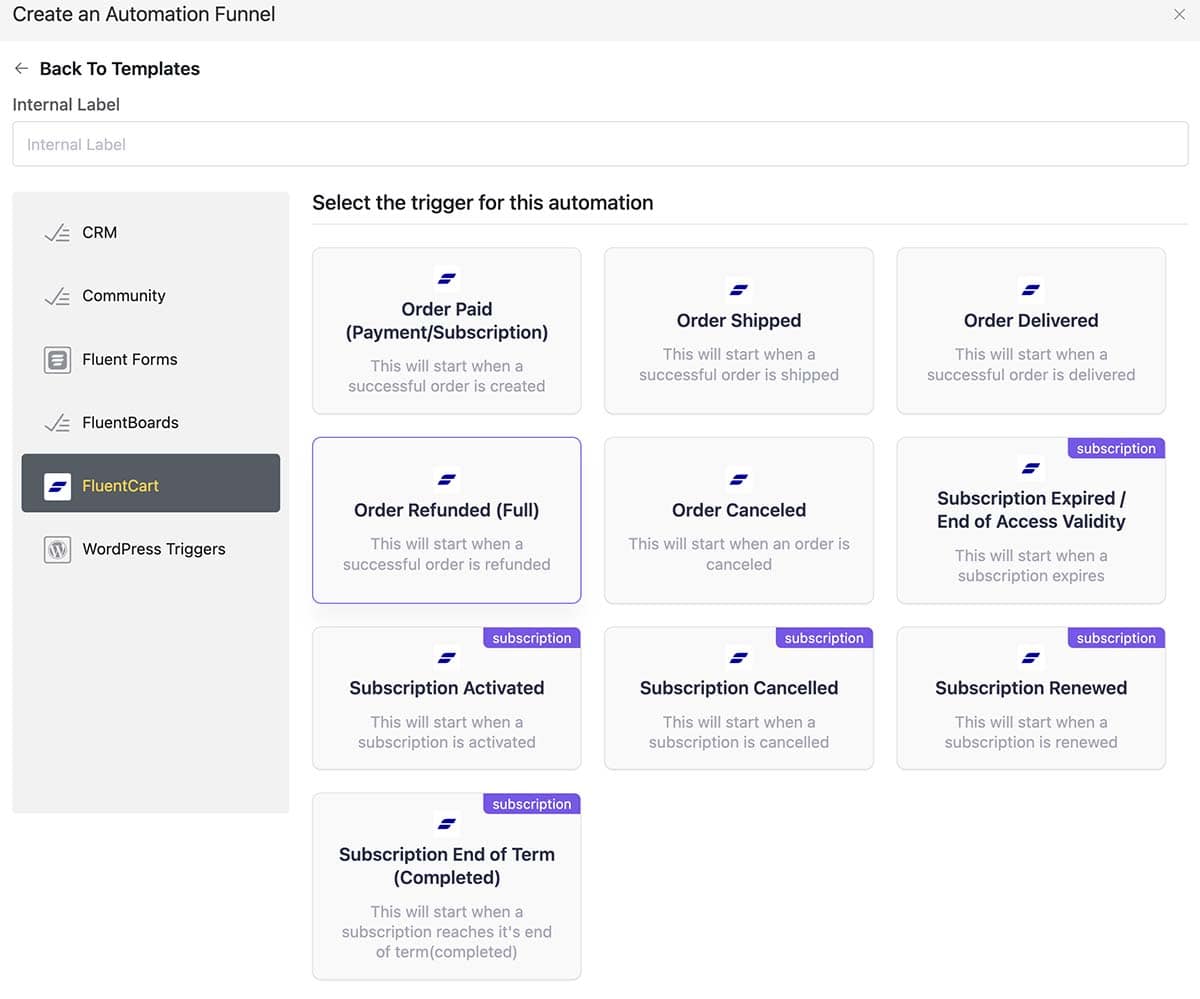
What You Can Do:
Automatic Contact Creation – Every FluentCart customer is automatically added to Fluent CRM with complete contact details:
List Management – Add customers to specific lists based on what they buy:
Tagging and Segmentation – Automatically apply tags based on:
Example Workflow: When someone buys your premium course, FluentCart automatically:
- Creates their contact in Fluent CRM
- Adds them to your “Premium Students” list
- Tags them with “Course: Advanced Marketing”
- Removes them from the “Prospects” list
- Triggers a welcome email sequence
Purchase-Based Automation – Create sophisticated email sequences triggered by purchases:
Subscription Management – Fluent CRM tracks subscription status and can trigger automations when:
Example Use Case: 30 days before a customer’s annual subscription expires, Fluent CRM sends an automated email reminder with a renewal discount code. If they don’t renew, a follow-up sequence offers a special win-back price.
License Expiration Reminders – For software vendors, this is invaluable. Set up automations that email customers 60, 30, and 7 days before their license expires, dramatically increasing renewal rates.
Abandoned Cart Recovery – When integrated with Fluent CRM, you can track abandoned carts and send recovery emails (this feature is in development but expected soon).
Customer Lifetime Value Tracking – Fluent CRM calculates each customer’s total spending, enabling you to:
Revenue Attribution – See which email campaigns drive the most sales, helping you optimize your marketing efforts.
The combination of FluentCart and Fluent CRM creates a powerful, self-hosted alternative to platforms like Kajabi or ClickFunnels, without monthly fees or data lock-in.
Fluent Community Integration
Fluent Community is a WordPress-based online community platform (similar to Circle or Mighty Networks). When integrated with FluentCart, it creates a seamless membership experience.
What You Can Do:
Automatic Access Control – Grant community access based on purchases:
Space-Level Access – FluentCart can grant access to specific community spaces:
Purchase-Gated Content – Make community spaces available only to customers who’ve purchased specific products. This turns your community into a powerful upsell tool.
Automatic Profile Updates – Customer information flows from FluentCart to their community profile, creating a unified experience.
Example Workflow: Customer purchases your “Pro Membership” product. FluentCart automatically:
- Processes the payment
- Grants access to Fluent Community
- Adds them to the “Pro Members” space
- Triggers a welcome email with community onboarding
- Creates their profile with their purchase information
When their subscription renews, access continues. When they cancel, access is automatically removed (you can configure grace periods).
This integration is perfect for:
Fluent Support Integration
Fluent Support is a helpdesk and support ticket system for WordPress. The integration with FluentCart enables superior customer support.
What You Can Do:
Automatic Customer Identification – When a FluentCart customer submits a support ticket, Fluent Support automatically recognizes them and displays:
Purchase Verification – Support agents can instantly verify what products a customer owns, eliminating “I lost my download link” issues.
Priority Support Based on Purchases – Give VIP customers priority support:
Order-Specific Support – Customers can submit support tickets directly related to specific orders, and support agents see all order details without asking for order numbers.
Example: Customer emails support saying their license key isn’t working. Fluent Support shows the agent:
The agent can assist you immediately without requiring account details or order numbers.
Fluent Affiliate Integration
Fluent Affiliate is an affiliate management system for WordPress. When paired with FluentCart, you can run a complete affiliate program from your WordPress site.
What You Can Do:
Automatic Commission Tracking – When affiliates refer customers who purchase through FluentCart, commissions are tracked automatically.
Product-Specific Commissions – Set different commission rates for different products:
Lifetime Commissions – Pay affiliates for all future purchases from customers they refer, not just the first sale.
Affiliate Dashboard – Affiliates see their FluentCart referrals, commissions, and conversions in the Fluent Affiliate dashboard.
This integration enables you to build a comprehensive sales ecosystem, encompassing products, email marketing, community, support, and affiliates, all hosted on your self-hosted WordPress site.
Even More Integrations
The list of integrations keeps growing, but includes:
The Bottom Line on Integrations
FluentCart’s integration story is still being written. The native Fluent integrations are excellent and mature. The webhook system provides flexibility for custom connections. However, if you require extensive third-party integrations with specific platforms, you’ll need to evaluate whether webhooks and Zapier meet your needs.
For digital entrepreneurs willing to embrace the Fluent ecosystem, the integration experience is outstanding. For those requiring connections to specific non-Fluent tools, it’s workable but not as polished (yet).
The good news is that FluentCart is actively developing, and new integrations are being added regularly. If a critical integration is missing today, check the roadmap, as it may arrive within months.
User Experience (Frontend)
FluentCart delivers a clean and modern shopping experience right out of the box. Its frontend design integrates smoothly with your existing WordPress theme, especially those built with Kadence, Blocksy, or Astra. The layout feels intuitive for both store owners and customers — not flashy, but thoughtfully designed for conversion.
Clean, Modern Interface
FluentCart utilizes a lightweight, block-based structure that ensures pages are fast and visually consistent. Buttons, forms, and messages follow a minimal design that’s easy to customize through your theme’s settings or custom CSS.
It avoids clutter and focuses attention on the product and checkout flow, which is ideal for smaller shops and digital product sellers.
Product Browsing and Filtering
Product pages are straightforward but effective. You can organize products by categories or tags, and display them in grid or list views using Gutenberg blocks or shortcodes. While it doesn’t include advanced AJAX filters like those found in larger e-commerce platforms, the simplicity keeps the browsing experience fast and user-friendly.
Variant Selection
FluentCart handles product variations such as size, color, or license type through a flexible attribute system. Variant dropdowns update pricing and availability instantly, without requiring a page reload, which makes the buying process feel seamless. For small catalog stores, this feature feels smooth and reliable; for larger inventories, you may need to plan your product structure carefully to maintain clarity.
Shopping Cart
The shopping cart integrates directly within the site’s flow, either as a separate page or a slide-in drawer, depending on your setup. It’s easy to review quantities, apply coupons, or remove items before checkout. The live price updates and lightweight code make it feel responsive even on mobile devices.
Checkout Process
The checkout experience is one of FluentCart’s best points. It’s fast, distraction-free, and optimized for conversions. Customers can check out as guests or create accounts during checkout. The form fields are minimal, with smart defaults and validation that reduces errors. Payment gateways like Stripe and PayPal are supported natively, and the checkout integrates well with FluentCRM for post-purchase automation.
Customer Account Area
Registered customers get access to a clear and functional account dashboard. They can review order history, download invoices, manage addresses, and update payment details. While the layout isn’t flashy, it’s practical and mobile-friendly. Store owners can further personalize it using FluentCRM or FluentSupport integrations to enhance the post-purchase experience.
Admin Experience (Backend)
FluentCart provides a streamlined backend experience that feels familiar to anyone comfortable with WordPress. The interface is clean, organized, and designed to keep store management efficient without overwhelming the user. It seamlessly integrates into the WordPress dashboard, avoiding the clutter often associated with larger e-commerce plugins.
Intuitive Dashboard
The main FluentCart dashboard gives a quick overview of store performance, recent orders, and product activity. It’s designed for clarity, showing actionable data without unnecessary charts or distractions. Key metrics are easily accessible, and most settings are just a click or two away. The focus on simplicity helps keep daily operations quick and manageable.
Product Creation Workflow
Creating products in FluentCart is a straightforward process. The workflow utilizes a single-page editor, where you can set pricing, variations, inventory, and images in one convenient location. The layout is logical, and the fields are well-labeled. For stores that sell digital downloads, license keys, or service packages, the setup options are flexible yet straightforward. Store owners who have used WooCommerce will find FluentCart’s product management easier to navigate.
Order Management
Order management in FluentCart is direct and efficient. You can view, update, or refund orders from the same screen. Each order record displays detailed information about products purchased, payment status, and customer details. The filtering and search options make it easy to locate specific orders, and built-in automation with FluentCRM can trigger notifications or follow-ups when an order changes status.
Customer Management
FluentCart features a straightforward yet effective customer management section. You can view a complete list of customers, their contact details, order history, and lifetime value. The integration with FluentCRM enhances this area by allowing segmentation, tagging, and automated email sequences based on purchase behavior. For small to medium-sized stores, this combination provides powerful customer insight without needing third-party tools.
Comprehensive Reporting
FluentCart offers essential reports that cover revenue, sales trends, and customer data. The reporting dashboard provides a clear overview of performance over time, enabling store owners to identify top products and customer activity. While the reporting tools are not as advanced as those of enterprise-level platforms, they provide sufficient actionable information for most small business needs.
Settings Organization
All settings in FluentCart are organized logically within the WordPress admin menu. Sections are clearly grouped by function, including payments, taxes, shipping, and email notifications. Each option includes short descriptions, so configuration rarely requires additional documentation. The plugin maintains a balance between flexibility and simplicity, making setup approachable even for first-time store owners.
Comparison to Competitors
vs. WooCommerce
WooCommerce is the 800-pound gorilla of e-commerce plugins for WordPress. Much like that gorilla, it’s old, smelly, and mostly moves slowly. It requires a plethora of plugins to add features and functionality that are not included in WooCommerce itself. In short, it’s not really a complete product.
Speed and Performance
FluentCart is lighter and faster than WooCommerce. It avoids the heavy database queries and plugin dependencies that often slow down WooCommerce sites. The result is a smoother experience for both customers and administrators.
Simplicity vs. Complexity
WooCommerce offers a massive feature set, but it can feel overwhelming for smaller stores. FluentCart focuses on simplicity, providing essential e-commerce tools without the lengthy setup process or constant need for fine-tuning.
Extension Dependency
Many WooCommerce stores rely on multiple paid extensions to add features such as subscriptions, order management, and marketing automation. FluentCart integrates these capabilities through the Fluent ecosystem, reducing both cost and plugin clutter.
Database Bloat
WooCommerce generates numerous custom tables and metadata entries that can accumulate in size over time. FluentCart uses a more efficient data structure, keeping your WordPress database lean and easier to maintain.
One of my clients has an ancient WooCommerce site for his manufacturing business. The tables were huge. Even after truncating old data, the performance increase still doesn’t match FluentCart’s speed. It’s not even close.
That said, there are some critical features available for WooCommerce that FluentCart still lacks, like product customization and robust inventory management.
vs. Shopify (SaaS)
Shopify is one of the most popular hosted e-commerce platforms, known for its ease of use and professional templates. It eliminates the need to manage hosting or technical setup, making it appealing to beginners and busy business owners.
However, this convenience comes with trade-offs in terms of flexibility, data ownership, and long-term costs. FluentCart offers an alternative for WordPress users who prefer complete control and lower ongoing expenses.
Data Ownership
With FluentCart, all store data remains under your control. Unlike Shopify, there are no restrictions on exporting customer information, products, or orders, and you maintain full access to backups and hosting.
GDPR and Data Control
Because FluentCart runs on your own WordPress installation, you have complete control over how customer data is stored, processed, and deleted. This makes it easier to comply with GDPR obligations such as handling data access requests or erasing personal information.
With Shopify, customer data resides on their servers. Although Shopify is GDPR-compliant as a processor, you have less direct control and must rely on its tools and policies for data management. A self-hosted setup gives you greater transparency and accountability for data privacy.
Monthly Fees
Shopify requires ongoing monthly payments, plus transaction fees, unless you use its payment system. FluentCart has a one-time license cost, and you only pay for the optional services or hosting you choose. Any transaction fees are from the payment gateways you use.
Flexibility
Shopify limits customization unless you upgrade to higher plans or use specific apps. FluentCart enables full customization within WordPress, providing you with the freedom to modify layouts, checkout fields, and workflows.
Lock-in Risk
Shopify users are tied to its platform and hosting. Migrating away can be a time-consuming and challenging process. FluentCart runs entirely on your WordPress site, so you can move hosts or export data whenever you choose. Shopify reserves the right to change its terms or pricing at any time. That lock-in risk is something that may lead to greater expenses for operating your store.
Planned Features
These additional features will bring FluentCart into parity with dedicated funnel builders like ThriveCart and ClickFunnels.
Current Limitations
FluentCart is evolving quickly, but as a relatively new e-commerce solution, it still has areas where it lags behind more established platforms. These limitations may not be deal-breakers for small or digital-first stores, but they are essential to consider when planning your setup.
Limited Physical Product Support
FluentCart works best for digital products, memberships, and services. While you can sell physical items, its tools for inventory tracking, shipping integration, and fulfillment are still limited. Store owners managing extensive inventories or complex shipping rules may find WooCommerce more mature in this area for now.
No Product Customization Options Yet
At present, there are no built-in features for product personalization, such as custom text fields or image uploads. This can be a drawback for stores offering made-to-order or configurable items. However, these capabilities are expected to expand as the plugin continues to develop.
Small Payment Gateway Selection
FluentCart currently supports a smaller set of payment gateways compared to WooCommerce. Stripe, Mollie, and PayPal are available options, but others, such as Authorize.net, Square, and regional gateways, are not yet supported. Most common needs are covered, but stores targeting international audiences may want broader payment flexibility.
New Product, Smaller Ecosystem
As a relatively new plugin, FluentCart’s user base and community are still in the process of growing. There are fewer third-party tutorials, extensions, and integrations available today, though the existing Fluent ecosystem (FluentCRM, FluentForms, FluentSupport) offers strong native connections.
Limited Third-Party Integrations
FluentCart integrates well within the WPManageNinja family of products, but offers limited external integrations compared to WooCommerce or Shopify. Marketing and automation tools like Zapier, Mailchimp, or Klaviyo may require workarounds or custom connections.
Product Bundles
It’s common for e-commerce shops to create bundles, often at a discount, which combine sales of multiple products. I don’t see a straightforward and easy way to do that in FluentCart. Perhaps you could create a new product, but that’s an inefficient hack for something that many shop owners need.
Future Outlook
FluentCart is still in its early stages of development. Still, the development team has demonstrated a strong record of rapid updates and user-focused improvements across their other products, such as FluentCRM and FluentForms. That same pattern suggests that FluentCart will continue to evolve at a steady pace.
New integrations and features are already on the roadmap, including enhanced inventory tools, additional payment gateways, and expanded options for handling physical products. The Fluent ecosystem is also maturing quickly, with tighter connections between FluentCart, FluentBooking, and FluentSupport expected to enhance the overall customer experience.
The team’s transparent communication and commitment to customer feedback make FluentCart’s future promising. For users who value control, privacy, and a cohesive WordPress-native stack, FluentCart has the potential to become a strong long-term ecommerce platform as its ecosystem grows.
FluentCart Review Summary
FluentCart offers a refreshing alternative for WordPress users who want complete control over their e-commerce store without the complexity of WooCommerce or the recurring costs of Shopify. Its design is lightweight, fast, and well-integrated with the broader Fluent ecosystem, making it an appealing choice for entrepreneurs, educators, and service providers selling digital products or memberships.
The user experience feels smooth for both customers and administrators, with a modern checkout flow and an intuitive dashboard. While FluentCart is still developing its physical product features and third-party integrations, it already provides a strong foundation for simple to mid-level e-commerce needs.
If you value data ownership, GDPR compliance, and the flexibility of WordPress, FluentCart is worth serious consideration. It’s especially well-suited for creators and small business owners who prefer to keep their tools in-house rather than relying on external SaaS platforms.
As the Fluent ecosystem continues to grow, FluentCart has the potential to become a leading self-hosted ecommerce option for WordPress users seeking speed, simplicity, and independence.
I have a few instances of FluentCart running, and I’ve shared a playground area for some clients with WooCommerce to explore it. Before I learned of FluentCart, I had purchased a WooCommerce add-on that I expected to use, as I no longer wanted to use ThriveCart, mostly due to its limitations in terms of style and functionality.
Now I’m actually excited at the prospect of implementing FluentCart in my business and for some of my clients. My experience with WP Manage Ninja is that they provide continuous development and improvement, excellent support, and a lot of integration with their products. They’ve used all of their own products inside their business to test before delivering them.
I believe every business needs to do its due diligence for essential tools, and that’s one of the main reasons I created this FluentCart Review article. I hope it helps you make a decision. Suburbia Press endorses and recommends FluentCart as its Top Buy for an e-commerce solution.

This is one of the best written reviews I have read! Nice job! Bought via your link to help support your efforts. Hope you write more reviews like this in the future! :)
Thanks for being so detailed and covering all the angles!
Thanks, Eric. I appreciate the comment and the purchase. I’ll try to make sure I have a few more reviews like this in the pipeline.
Щебень гравийный — оптимальный материал для дорожных и строительных работ; подробные варианты и условия заказа смотрите на [url=https://graviyniyinfo.ru]гравийный щебень[/url].
В первом разделе рассмотрим физические свойства щебня и их значение для строительства.